

Collage Maker | Photo Editor
Advertisement
Screenshots
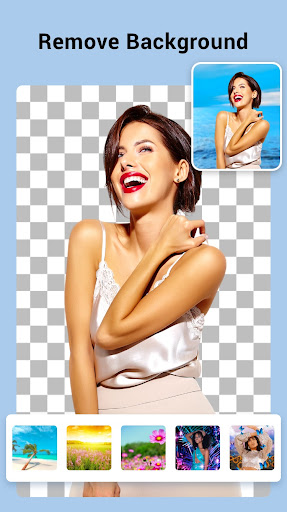

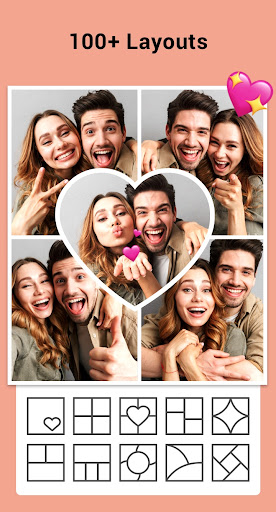


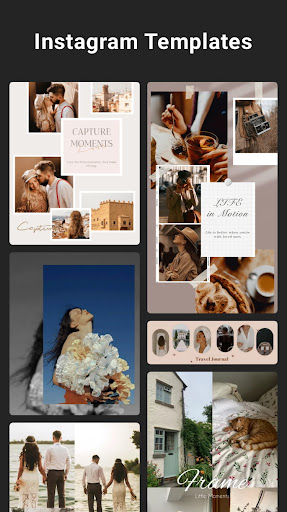
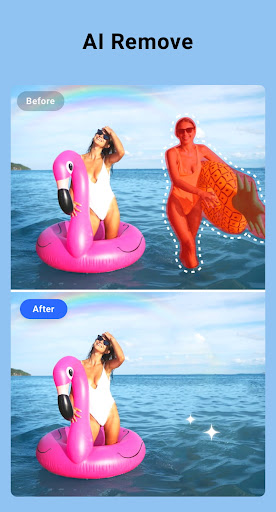
Advertisement
About Collage Maker | Photo Editor
Collage Maker |Photo Editor is a super easy-to-use mobile app, specially designed for everyone to create beautiful photo collages and make pictures better simply and quickly. As an intuitive Android app, it has a variety of creative features that make editing photos easy and fun, so you can have fun whether you are a novice or a professional photographer. Whether you want to put together a personalized collage or improve the quality of photos, this software can give you a smooth experience and meet the needs of a variety of users.
Overview
core highlight
- The interface is super intimate, making beautiful collage photos simply too easy, no matter what your technical level is, you can easily get started.
- Full coverage of functions, including customizable templates, a variety of photo editing tools, and rich background options to help your pictures look better.
- Supports high-resolution export, ensuring that it looks professional whether it is posted online or printed.
- You can also preview the editing effect in real time, and the changes can be understood at a glance, without being stuck at all.
- That drag-and-drop operation is super intuitive, making it easy to arrange the photos in an orderly manner.
- It can also be used offline, and you can make and edit collages as you like without the Internet.
- You can choose from a variety of filters and special effects, making the picture very artistic easily.
Who is this app suitable for?
This mobile APP is particularly suitable for photography enthusiasts, social media content creators, and ordinary users who want to make some beautiful collages at any time. Anyone who wants to use a simple and powerful tool for personal works or professional projects can try it.
Whether it's preparing content for your social accounts or creating memories with friends and family, this Android app can help you turn ideas into reality. Various functions, whether it is quick retouching or exquisite design, it is very suitable for daily use.
Why choose this App
The biggest highlight of this application is the intuitive operating experience on the rich combination of functions, allowing everyone to easily edit photos. Offline use and high-quality export bring super convenience and reliability.
Don't hesitate, choosing this Android app is to choose a reliable tool that combines professional-level editing functions and ease of use, allowing you to make professional-level collage photos without having to work hard.
Top Recommended Alternative

Pros & Cons
Pros
- intuitive user interface
- Powerful editing tools
- HD export options
- Frequent updates and new features
Cons
- Free features are limited
- Occasionally break down
- Export watermarked
- Insufficient advanced editing functions
- Poor performance of low-end equipment
Advertisement
Download Collage Maker | Photo Editor

FAQ
Is Collage Maker | Photo Editor safe to use?+
Of course, Collage Maker| Photo Editor is a mobile app that is quite safe and reliable. It cares about users 'privacy and security issues. This software was developed by a reputable team and will be updated regularly to patch some loopholes and improve performance. The whole process allows people to use it with confidence and do not have to worry about safety or anything.
Asa mature application solution, it closely follows standard data protection rules. You can use this Android software to repair puzzles without worrying about any risks.
How do I install Collage Maker | Photo Editor on my device?+
Installing this popular Android app is actually quite simple. You just need to search for "Collage Maker" in the Google Play Store| Photo Editor can be found. This app has a very friendly interface and steps to guide you to download and install. To put it bluntly, it is convenient and fast.
Onceinstalled successfully, you can start creating puzzles and retouching pictures immediately. This software is designed quite conveniently. It can be used when opened and is easy to operate. It is really worry-free and simple.
Does Collage Maker | Photo Editor work on old Android versions?+
Well, it supports many different Android system versions and can be used on most devices. However, for the best experience, it is recommended to use the latest system version supported by the device, which will make performance smoother.
Ifyou are not sure about the compatibility of your device, take a look at the application introduction on Google Play. It will be very detailed and specify the minimum version required, so that it will be more comfortable to use and all functions can be used.
What are the main features of Collage Maker | Photo Editor?+
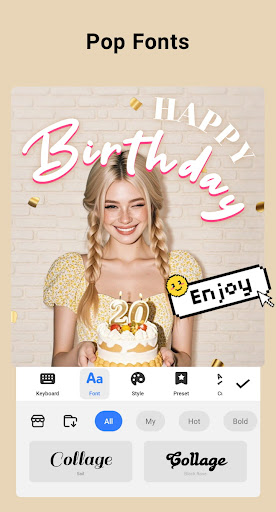
This software has a lot of useful tools, such as photo splicing, adding filters, text, stickers and so on. The interface is particularly intuitive and quick to use. You can combine multiple pictures together, adjust the layout at will, and use your creativity.
Asa launcher specifically designed for retouching, it also provides real-time previews, provides advanced editing options, and exports high-quality images. Whether you are a novice or a veteran, you will have a lot of fun using it and the experience will be great.
Can I trust the privacy policies of this app?+
Of course you can! Collage Maker |Photo Editor attaches great importance to user privacy. Its privacy policy is clearly written and tells you how to store and process data. It makes people feel transparent and trustworthy.
Asa mature application, it strictly abides by industry standards for data protection. You can use it to edit pictures with confidence and without worrying about personal information being abused or leaked.
Is Collage Maker | Photo Editor suitable for professional use?+
Although it is mainly for ordinary users, it actually has some functions that can help you create some semi-professional works. For example, high-quality editing tools and creative functions are suitable for doing social media content, personal small works and even promoting some small businesses.
Ifyou need to do very professional retouching, you may have to use special software, but in the end, this software is still a good choice for users who want to quickly make puzzles and easily retouching pictures, and the experience is quite smooth.
How often is Collage Maker | Photo Editor updated?+
The development team is very diligent, often pushing new versions, adding new features, optimizing performance, and ensuring support for the latest Android system. Each update makes the overall experience better and makes the software more stable and secure.
Keepingit updated means that you can use the latest features and security patches. In short, you can use it with peace of mind and play with peace of mind. The software has been constantly improving, and the user experience has also continued to improve.
Where can I find more help or support for this app?+
If you want help, you can go to Google Play's application details page to find support information, where contact information and update notifications are usually available. There are also many users who will share their experiences and skills in some photo editing forums or communities, which is very helpful.
Ifyou encounter any specific problems, you can also contact the official customer service through the contact information in the app store, and the problem can generally be solved. This way, you can continue to happily use this good software for puzzles.
Customer Reviews
Collage Maker | Photo Editor is widely praised for its user-friendly interface, smooth functionality, and ease of use, making it suitable for both beginners and daily editing tasks. Users appreciate its intuitive design, free features for creating beautiful collages, and seamless integration with social media like Instagram Stories. However, opinions are mixed regarding advertisements: while many find them skippable and non-intrusive, some users report the app is overloaded with intrusive ads, which negatively impacts the experience. Similarly, the app delivers outstanding results for most, but a few users note that certain features may not meet all expectations. Overall, it is a highly recommended photography tool with strong satisfaction rates.
Write a Review
Share your experience with Collage Maker | Photo Editor. Submissions are reviewed before publishing.
You Might Also Like
More apps you may want to try next.



