VN - AI Video Editor
Screenshots
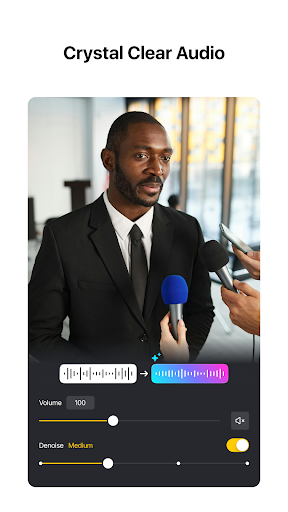
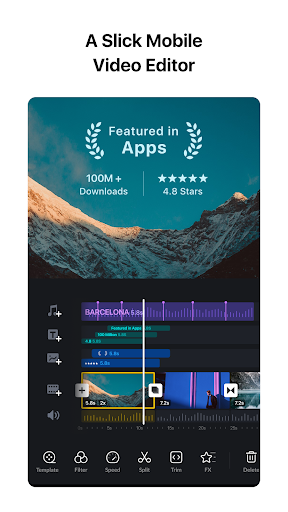
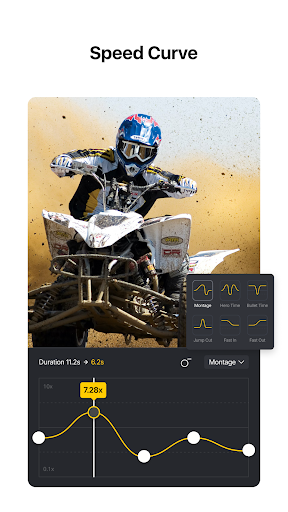
About VN - AI Video Editor
VN - AI Video Editor is a good mobile phone software, especially suitable for those who want to easily edit video on Android devices. It is quite functional and easy to use. It has many simple and easy-to-use tools, such as editing, special effects, subtitles and so on. Whether you are a casual player or a quasi-professional content creator, this software can help you edit video instantly, which is convenient and reliable.
Overview
core functions
- The ultra-simple video editing tool allows users to easily crop, split, and splice clips to create professional effects.
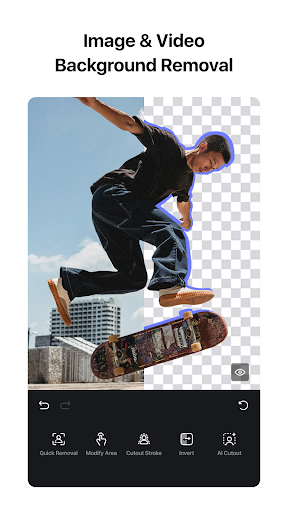
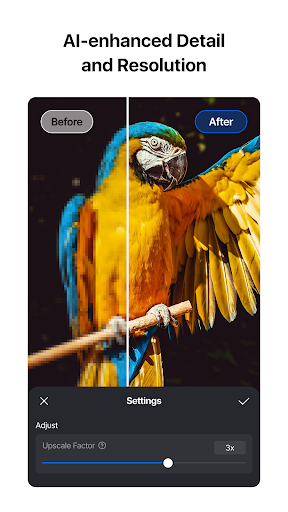
- Powerful AI functions allow you to identify scenarios yourself, intelligently optimize them, save peace and time, and speed up your editing process.
- Various export options, support high-definition format, suitable for sharing on social platforms or retaining yourself, you can choose.
- Sync to multiple devices in real time to ensure that every modification is not lost, and the cross-platform experience is smooth and natural.
- The interface is particularly considerate and tailor-made for mobile phone users. It is simple and easy to operate, and advanced editing can also be done on Android phones.
- Support offline editing without the need for the Internet. It is very convenient to use anytime and anywhere, and it is also okay when you are away from home.
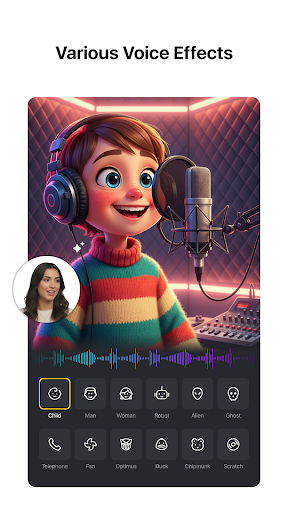
- Rich built-in special effects and transition animations make your work more dazzling without installing additional third-party plug-ins.
Who is suitable for using this app?
The software is particularly suitable for content creators, social media enthusiasts, or ordinary users who just want to make some cool videos on their phones. If you like to edit videos on your mobile phone, this platform is simple and easy to use and is just what you want!
Whether you're an amateur, like to share moments with friends, or a professional who needs reliable mobile editing tools, this Android app can meet all your needs. Want to quickly edit a video during travel, gatherings, and daily life? It can help you fix it!
Why choose this app
This software combines powerful features and intuitive design, making it easy for you to create professional-level works on your mobile phone. AI smart tools make complex editing easier and improve the overall experience. Anyone who uses it feels comfortable!
Standing out among similar software, it performs stably, supports offline editing, and has a trustworthy platform and high user satisfaction. Looking for a feature-rich and reliable mobile video editing tool? This is definitely worth trying, it's cost-effective!
Top Recommended Alternative

Pros & Cons
Pros
- User-Friendly Interface
- Advanced AI Editing Capabilities
- Wide Range of Templates and Effects
- Real-Time Collaboration Tools
- Affordable Price Point
Cons
- Limited Output Resolution Options
- Occasional Lag During Complex Edits
- Basic Free Version with Watermarks
- Limited Export Format Options
- Occasional Crashes in Large Projects
Download VN - AI Video Editor

FAQ
What is VN - AI Video Editor and how does it improve my app experience?+
VN - AI Video Editor is actually a versatile mobile App that helps you easily edit videos and so on. The interface is quite friendly. Whether you are a novice or an old player, you can produce professional works, which is quite cool.
Asa popular software in the video player and editing categories, it brings many powerful features, such as beautification with AI blessings, personalized tools, etc., to directly enhance your overall experience. This kind of easy-to-use solution allows you to quickly complete videos without having to mess with complex software.
Is VN - AI Video Editor safe to install and use on my Android device?+
Of course, the VN - AI Video Editor is quite reliable on Google Play and is very safe. It is not dangerous after scanning, and it also meets Google's security standards. This software is often used as a good helper for video editing and is quite trustworthy.
However, I still have to remind you that downloading from official channels can only be assured. It is important to protect your device and personal information. This software also has privacy protection and transparent permissions measures, which makes people feel quite at ease and full of security to use.
What are some key app features of VN - AI Video Editor?+
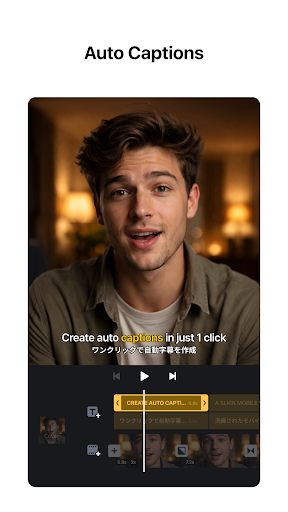
This mobile phone software is quite functional, including AI-driven editing tools, various special effects, transitions and text superimposition. The interface is very friendly and anyone can easily make high-quality videos.
Itcan also preview and easily export in real time, and the whole thing is quite easy to use. Its versatility is especially suitable for content creators or people who want to improve their video level on Android, and it is particularly convenient to use.
Can I use VN - AI Video Editor on different versions of Android?+
Yes, the VN - AI Video Editor is compatible with most new versions of the Android system, ensuring that it can be used smoothly on various devices. You can run well from entry level to flagship.
Rememberto pay attention to the latest system requirements to ensure that the software runs smoothly. It will be updated from time to time to support the latest system versions, make it better polished and the experience more reliable.
How do I get started with VN - AI Video Editor?+
It's quite easy to start using, just go directly to Google Play to search and download, and you can try various functions after installation. The interface design is very considerate, and even novices can quickly get started editing videos.
Youcan easily import material, apply AI optimization, and export finished products. The whole process is like turning the mobile phone into a portable editing studio, where videos can be processed anytime and anywhere, and the experience is quite smooth.
Does VN - AI Video Editor support sharing videos directly from the app?+
Of course, this software allows you to share edited videos directly on social media or save them on your phone. In this way, sharing becomes particularly convenient, and there is no need to copy and paste for a long time.
Whether you are using an app that comes with Android or another video editing launcher, this feature will help you save time and effort, allowing you to easily show off your work while ensuring that the software quality is very good.Are there any subscription costs or in-app purchases for VN - AI Video Editor?+
The software has free features and some paid advanced effects that unlock more special effects, remove watermarks and so on. In fact, it is quite flexible and can choose different plans according to your needs.
Asa relatively reliable application, transparency is good, allowing you to clearly know what you are spending on, and it also makes it easier for you to decide whether to try those paid features, depending on your specific editing goals and budget.
Can I use VN - AI Video Editor on multiple devices?+
Of course, because it binds to your Google account, you can continue to edit your projects on different Android devices. This is very convenient and allows you to switch seamlessly between multiple devices, and the experience is quite consistent.
Rememberto confirm your version and login information, keep your projects synchronized, and save your data. This flexibility is so sweet for content creators who often work on different devices.
You Might Also Like
More apps you may want to try next.