DYMO Connect
Advertisement
Screenshots
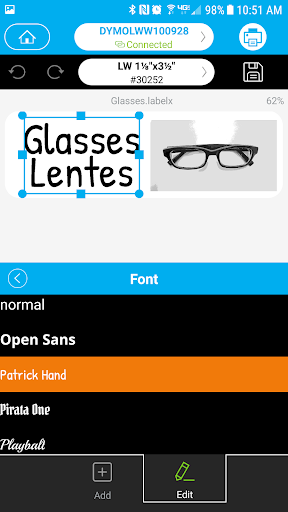
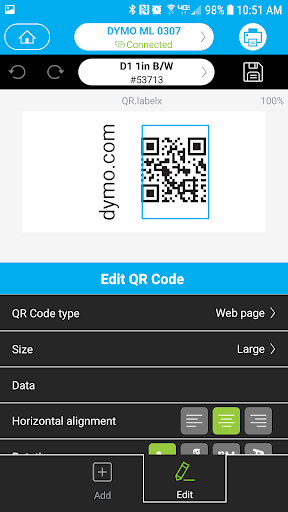
Advertisement
About DYMO Connect
DYMO Connect is actually a pretty good mobile phone application, it is very convenient to operate, whether it is home or office, you can use it to easily complete label production and printing. It can be used on Android, and the experience is quite smooth. There are many easy-to-use tools, and you can even customize tags as you want. If you want to design labels or manage printing tasks, this app is definitely a reliable choice. It's a really thoughtful tool that can make your labeling work super easy.
Overview
core functions
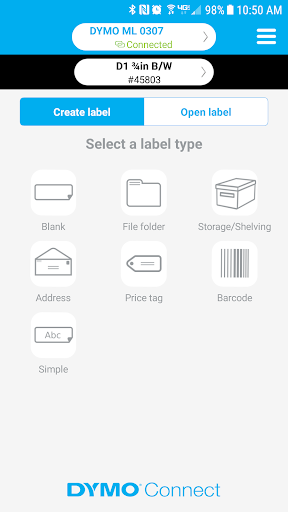
- The interface is super intuitive. Whether you are a novice or a veteran, it is easy to use, making it easy to create and manage tags.
- It can be synchronized to different devices in real time to ensure that your tags and settings are always up to date. It's a very thoughtful design.
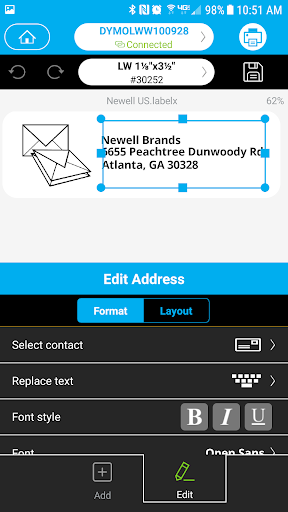
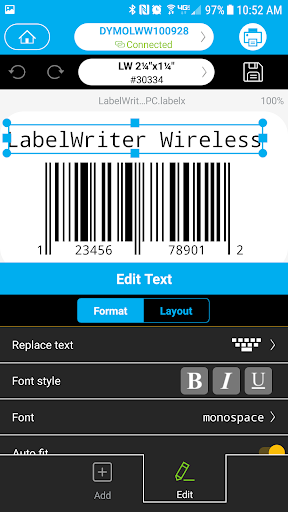
- There are many functions, such as printing barcodes and address labels, and customizing templates yourself, which is quite comprehensive.
- Offline mode has been completed, and it is really convenient to design and prepare tags even without the Internet.
- Supports various Dymo label printers. Basically, this software can be said to be a reliable companion for printing needs.
- Advanced editing tools help you accurately create labels. You can add text, pictures, and bar codes.
- Seamless integration with mobile phone cameras, data collection and label scanning are fast and convenient, and are particularly convenient.
Who is this App suitable for?
This mobile app is especially suitable for store owners, warehouse workers, or people who need to quickly get tags done on Android devices. Anyone who wants to find an efficient and easy-to-operate label sorting and printing tool can give it a try.
Whether you work in the retail industry, logistics industry, or just need a reliable labeling tool, this app can help you get it done. Especially when you need to print quickly, operate offline, or customize labeling, this app is a treasure.
Why choose this App
This software integrates a wealth of features that can help you greatly simplify your labeling workflow and is a smart choice on the Android platform. Support for real-time synchronization and offline use makes it handy no matter what environment it is used.
It combines a user-friendly interface with powerful printing tools to effectively solve the actual needs of users. With practicality and efficiency as the core, it provides a reliable digital labeling solution. The most important thing is that its functions are truly useful and worth a try.
Top Recommended Alternative
Pros & Cons
Pros
- intuitive user interface
- Rich label templates
- Seamless Bluetooth connection
- Customizable labeling options
- Cloud integration
Cons
- Poor compatibility with old equipment
- Break down occasionally
- Complex functions and steep learning curve
- Limited label editing
- Cloud functions rely on the network
Advertisement
Download DYMO Connect

FAQ
Is DYMO Connect easy to set up and use on my mobile phone?+
Well, it's quite convenient. DYMO Connect is designed quite thoughtfully. The interface is very intuitive and not troublesome to build. Whether you use Android or any other device, it can basically be done smoothly and smoothly.
It usually takes a few minutes to start, and the guidance in the app is quite considerate, taking you step by step. When everything is done, I print labels or something directly from my mobile phone. The experience is quite smooth and the overall use is very smooth.
Does DYMO Connect support differently for Android and iOS devices?+
Of course, DYMO Connect has both Android and Apple versions, and the compatibility is good. No matter what phone or tablet you use, you can find the right version. The purpose of this app is to make it easy for everyone to use without any difference.
If you want to get the latest version, you can go to Google Play or the Apple Store. Frequent updates can make software smarter, safer, and more stable. This is very important, after all, you can use it with confidence.
What are the main functions of DYMO Connect?+
This APP is quite functional and can make labeling simple and efficient. You can customize tags, manage tags easily, and connect wirelessly to supported DYMO printers, which is quite practical.
It also supports importing data from tables, designing various fonts and icons, saving templates and so on. In this way, the work flow will be much smoother and the user experience will be much improved. It is a very considerate design.
Is DYMO Connect a safe and reliable mobile app?+
Of course, this app attaches great importance to user security and data protection. It operates in accordance with standard security protocols to ensure that your information is safe during setup and use.
If you are using it to process some sensitive data, you can rest assured. There are frequent updates, and feedback from the community is constantly improving. Everyone feels that it is quite reliable and uses it with peace of mind.
Can I use DYMO Connect as an initiator for other print tasks?+
In fact, although DYMO Connect is mainly a dedicated software for labeling, it is also an application that can work smoothly with your device process. It is not a direct initiator, but it can be used with other productivity software, which is quite convenient.
If you want to use an application that can launch various functions, consider combining DYMO Connect with your existing application environment to achieve smooth multitasking printing.
What should I do if there is a problem installing DYMO Connect on my Android device?+
When encountering installation problems, first make sure your device meets the latest system requirements. Check that your network connection is working and make sure you downloaded the program from an official channel, such as Google Play.
If that doesn't work, try clearing the application cache, or shutting down and restarting. For some complex issues, go to the official support page or contact customer service to help you solve them. Don't worry, basically they can be solved.
Is DYMO Connect suitable for professional or enterprise-level use?+
Of course, this APP is quite powerful. It can not only satisfy individual users, but also help companies manage label. It supports batch label design, data import, wireless connection, etc., and is particularly handy to use in professional situations.
Many units use this APP to improve work efficiency, with a good experience and stable performance. Moreover, it supports multiple brands and multiple devices, making it a reliable partner and can be used quite smoothly in formal occasions.
How often is DYMO Connect updated? Will it improve functions?+
This application updates are quite diligent, often launching new versions, changing bugs, adding functions, and strengthening security measures to maintain the competitiveness of the software. For corporate users, these continuous optimizations are very important to ensure that they are used smoothly and with confidence.
Keeping the software updated will allow you to be better compatible with new devices and support new technologies. Overall, it will make this application more comfortable and easier to use, and the impression is quite good.
Customer Reviews
Users widely praise DYMO's hardware quality, but the accompanying Android app is overwhelmingly criticized for severe compatibility issues. The key complaint is that the app fails to function on Android 10 and later versions, often showing a blank white screen or crashing instantly, rendering printers unusable. While some users note the app worked on older Android versions (e.g., Android 4) and can print labels if supported, the vast majority report complete non-functionality on modern devices. Connection problems are frequent: Bluetooth printers are not detected, auto-detection fails, and there is no manual add option. The UI is described as unintuitive and clunky, making label size selection difficult even for tech-savvy users. Some users mention that the app has not been updated since 2017, leading to a feeling of neglect. Although iOS counterparts may work, the Android experience is deemed unacceptable for a leading brand.
Write a Review
Share your experience with DYMO Connect. Submissions are reviewed before publishing.
You Might Also Like
More apps you may want to try next.