
Verizon Family
Advertisement
Screenshots

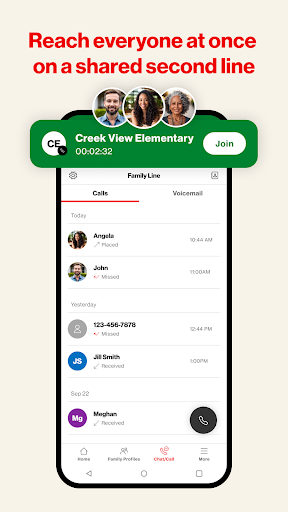
Advertisement
About Verizon Family
Verizon Family is a very thoughtful mobile App, specially designed for home users to help you easily stay in touch and manage your digital life. It can be used by both Android and Apple. With content filtering, screen time control, and activity monitoring, it feels like having a caring guardian angel, safe and smooth. Its interface is really ultra-intuitive, making it convenient for parents and guardians to keep abreast of the situation at any time, ensuring that their families can use it safer and more at ease.
Overview
core functions
- This App's parental control functions are particularly comprehensive, making it easy for you to control your family's devices and screen time. It's really convenient and practical!
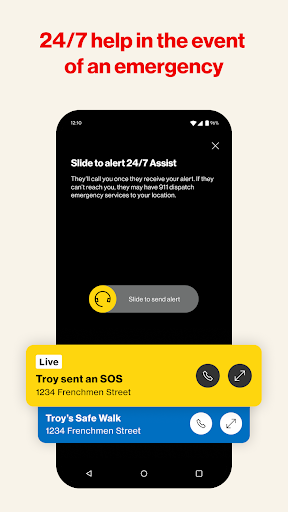
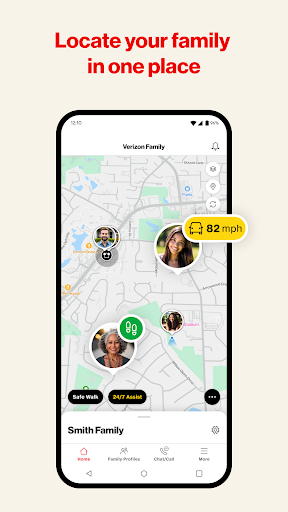
- Real-time location sharing allows family members to keep in touch at any time and know each other's movements, which gives them a much more sense of security.
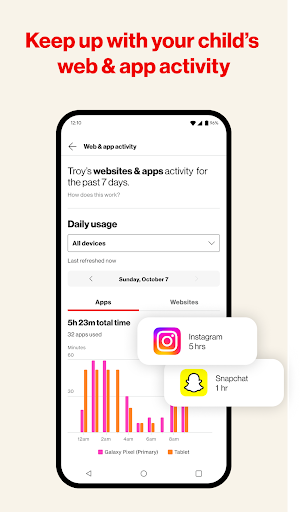
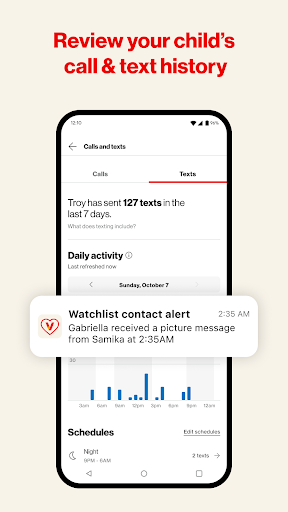
- Customizable activity reports can help you understand your family's use of the App and those behavioral habits. They are quite interesting and useful.
- There is also a message notice inside, so that parents can keep track of their children's movements at any time and maintain communication. It is a very considerate design.
- Perfectly integrated with Android devices, smooth operation, simple setup, and almost no need to worry about compatibility issues.
- Bring your own scheduling tool to set some usage boundaries to help your family develop healthy habits of using computers at home or away from home.
Who is this App suitable for?
It is mainly used by parents or guardians who want to manage and monitor their digital life at home. It attracts those friends who are technical savvy because everyone cares about security and control!
If you have children or teenagers at home, this App-based solution is particularly suitable. It helps you see what apps they use, sets some restrictions, and guides them to develop good habits in daily life or when they are away. It is quite practical.
Why choose this App?
It is an Android app that is reliable and easy to use, with simple and clear functional design, which can help families become more orderly and closer. Stable performance and privacy value can bring a great sense of peace to parents. It is really the first choice!
What makes it special is that it focuses on providing a trustworthy and comprehensive App solution that can truly solve various problems in the family, and is concise, clear and efficient. Using these practical functions is both safe and reassuring, giving you a full sense of peace of mind.
Top Recommended Alternative
Pros & Cons
Pros
- The user interface is particularly friendly
- real-time monitoring function
- Restrictions can be customized
- Support for multiple devices
- remote control
Cons
- Occasionally unstable connection
- Limited content filtering capabilities
- Advanced functions are difficult to get started
- Power consumption is slightly higher
- Limited support in some regions
Advertisement
Download Verizon Family


FAQ
Is Verizon Family safe to use and protect my family's data?+
Gee, Verizon Family is actually quite reliable and does a good job in security. It uses industry-standard encryption technology to ensure that your family's information is safe when using the app. You can basically rest assured that the data will be kept confidential and there will be no problem.
Moreover, Verizon is quite famous and gives people a very reliable feeling. Their application has functions such as monitoring tools and parental controls, which are both transparent and not complicated to operate, making it more practical for parents to use them.
How do I set up Verizon Family on my Android device?+
It's actually quite easy to get Verizon Family on an Android phone. Go to the Google Play Store to download it first, then follow the instructions step by step, and you will be able to register an account soon. This app interface is quite intuitive, quick to use, and easy to understand at a glance.
Optimize the experience for Android, smooth operation, and easy access to key functions, such as managing home devices and setting usage restrictions.After installing it, you can adjust the settings according to the actual situation of your home, which is quite convenient.
What are the main features of Verizon Family?+
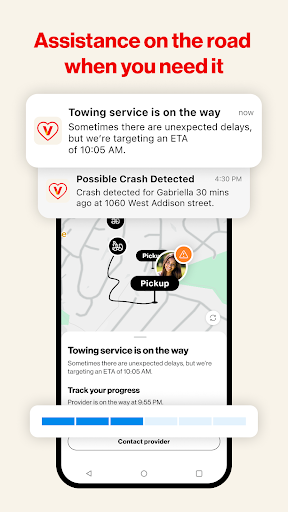
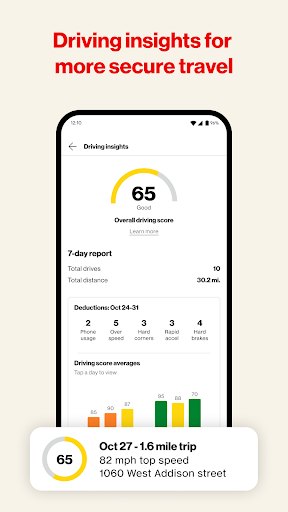
This application mainly has several major functions such as location tracking, network filtering, screen time control, and usage monitoring. It's quite intuitive to use. Parents can easily see their children's use of the device, all in one interface and at a glance.
Asa comprehensive tool, it aims to help you create a safe and responsible mobile phone environment, so it is quite practical in home mobile phone management.
Can I install Verizon Family on multiple devices?+
Of course, Verizon Family supports multi-device management, and several people's mobile phones and tablets can be controlled under one account. In this way, it is very convenient for the family to use, and centralized management does not require trouble.
Asan application-based solution, it synchronizes smoothly between Android devices. Whether it's a mobile phone or a tablet, or even using both together, the experience is similar and quite powerful.
Does Verizon Family work on both Android and iOS?+
That's right, Verizon Family has both Android versions and Apple's iOS versions, which are quite comprehensive. Whether you use Android or Apple devices, you can enjoy a similar functional experience, no difference.
Thiscross-platform support is so convenient. No matter which device at home, you can use this APP together. Everyone can make it more convenient and management will be more convenient.
What should I do if I forget my login details?+
If you forget your password or something, don't worry. Just look for the reset account password directly in the app or app store. The process is fast and won't take you too long.
ThisAPP is quite considerate. It will verify your identity first and then reset your login information after it is confirmed. In this way, privacy and security can be guaranteed, and family members can use it with more confidence.
Are there any safety concerns I should be aware of?+
Of course, Verizon Family attaches great importance to security, such as encryption and privacy controls. Use it to monitor equipment at home without fear of information leakage. It is quite safe.
Butremember to keep the application updated to the latest version so that security measures can keep up, otherwise there will be loopholes. Verizon has been enhancing its security features to make sure you use them with peace of mind.
Is Verizon Family suitable for older children and teenagers?+
Yeah, this is actually quite flexible and can be used by older children or teenagers. You can adjust your own settings, such as positioning and network filtering, which can be managed without overdoing it. It's quite humane.
Thisdesign supports communication and safe use of the machine, and is especially suitable for families of different ages. It can protect children without hurting feelings, which is very good.
Customer Reviews
Verizon Family is praised by some for helping monitor children's locations, especially as a workaround for Android users tracking Apple Watch kids, and for offering peace of mind. However, the app is plagued by significant issues. Location accuracy is highly inconsistent: some users find it precise, while others report it shows family members miles away or updates slowly, often hours late. Functionality is unreliable – the VPN required for parental controls frequently disables itself, and the app crashes, loops on login, or fails to display driving insights. Many users criticize the intrusive requirement to share their own location just to use their child's watch, and call the interface confusing. Customer support is often unhelpful, with billing errors and failed escalations. Though a few see it as a useful tool, the majority consider it poorly executed and frustrating, especially for Gizmo watch parents who have no alternative.
Write a Review
Share your experience with Verizon Family. Submissions are reviewed before publishing.
You Might Also Like
More apps you may want to try next.