RoughAnimator - animation app
Screenshots
About RoughAnimator - animation app
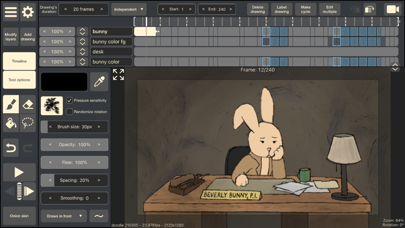
RoughAnimator is really a multi-functional art and design mobile phone application, especially suitable for easily creating delicate animations. Whether you're a novice or an old hand, this Android software provides powerful tools to help you turn the ideas in your head into reality. It has a friendly interface and is very smooth to use. It is an ideal choice for finding an efficient and practical animation tool ~
Overview
core feature
- This app has a super-friendly timeline editor that allows you to adjust every frame of the animation little by little. It is particularly meticulous and fulfilling.
- The real-time synchronization function is really great. There is no interruption in working together. You can see it immediately on all devices with just a little update. It feels like the experience is smooth.
- Support for multi-layer and advanced drawing tools gives you more freedom and allows you to create delicate and rich animations without worrying about limitations.
- The interface is particularly intuitive and can be used easily whether you are a novice or a senior animator. You can also customize the workspace, which feels quite intimate.
- Export options include high-definition videos and GIFs, allowing you to easily share your work and feel particularly convenient without worrying about format issues.
- Built-in various preset brushes and color boards make it easy to use, which saves trouble and inspires inspiration, making animation more interesting.
- Support offline mode, you don't have to worry about having no network at work, and it is especially suitable for friends who do animation anytime, anywhere.
Who is this App suitable for?
This mobile app is perfect for artists with dreams, animation apprentices, and independent creators who like to create animations on Android devices. It satisfies users who want a painting design experience that is both simple and powerful.
Whether it's short films or detailed animations, this App-based solution is great for hobbyists and professionals. Whether it is a classroom project, a personal work, or a professional portfolio, you can use it in a one-stop manner on the Android platform.
Why choose this App
With its rich features and design concepts, this Android app is very attractive to both casual and professional animators. It provides a smooth and smooth experience, makes complex animation technology simple, and everyone can easily make professional-level works.
Unlike other animation apps, it places special emphasis on ease of operation and variety of tools, giving you a solution to common workflow problems, and also ensuring reliable performance so that all users can use it with confidence.
Top Recommended Alternative

Pros & Cons
Pros
- intuitive user interface
- Layer management system
- Built-in drawing tools
- time-saving features
- Affordable model
Cons
- Limited export options
- Lack of advanced animation features
- Poor performance on older equipment
- Learning advanced skills is a bit difficult
- Occasionally there will be a small bug or crash
Download RoughAnimator - animation app


FAQ
Is RoughAnimator suitable for beginners or only for experienced animators?+
RoughAnimator is actually a flexible mobile animation software that is suitable for both novices and experienced animators. The interface is designed quite intuitive and can be easily used for those who are just getting started, but it also has some advanced features that allow users with good skills to use more creativity.
Ifyou are new to animation, RoughAnimator will provide some useful tools and tutorials to help you get started. Experienced artists can use its powerful functions to create detailed and professional animation works.
How do I install and set up RoughAnimator on my device?+
It's actually quite simple to start using this software. Android users can download it directly from the Google Play Store, while iOS users can download it directly from Apple's App Store. Once installed, it will guide you through some basic settings, such as adjusting your workspace.
BecauseRoughAnimator is a pure software solution, most devices can run easily. The process of getting started is also very smooth, and it won't let you get lost in the cumbersome steps. It allows me to quickly start animation creation. It's a very thoughtful design.
Is RoughAnimator safe to use and how often is it updated?+
This RoughAnimator is quite reliable. People who have used it have good reviews. It was developed by a company with a good reputation and attaches great importance to user safety. This software adheres to strict security standards to ensure that your data is protected during use.
Developerswill also push updates frequently, fix some small bugs, and add new features to make the experience better and better. You can use it with confidence, whether it is Android or iOS, you can keep it up to date and in the most secure state.
Can I use RoughAnimator offline, or is an internet connection necessary?+
This mobile animation software can be used offline, making it very convenient to create and edit animations without any problems. As long as you install it, you can do it anytime, anywhere, and you can complete your project without requiring networking.
Ofcourse, if you want to back up or share your work in the cloud, you may need a network connection. But overall, RoughAnimator provides a smooth experience whether online or offline, which satisfies me.
What are some standout app features that make RoughAnimator popular among users?+
RoughAnimator has rich features, such as multi-layer support, customizable brushes, and frame-by-frame animation tools. These features can help you easily turn your ideas into reality, and they are easy to operate.
Itsinterface is also very friendly, and real-time preview of animations makes the entire experience great, allowing both novices and professionals to have fun. Various tools adapt to various animation styles, so it has become the tool of choice for many artists.
You Might Also Like
More apps you may want to try next.