PPSS22 Emulator - PS2 Emulator
Advertisement
Screenshots
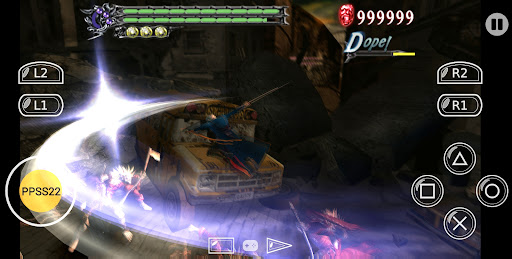
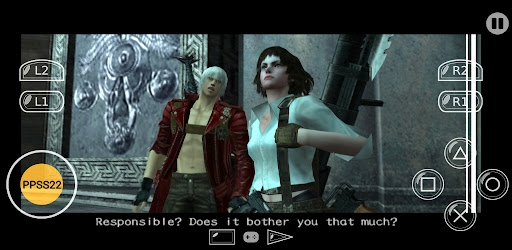
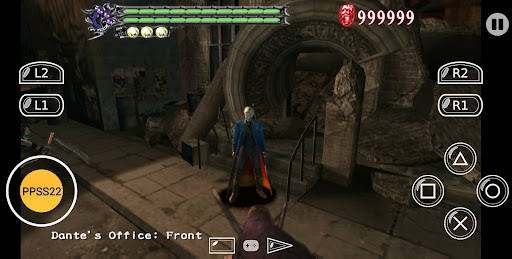
Advertisement
About PPSS22 Emulator - PS2 Emulator
PPSS22 Emulator - PS2 Emulator is actually a very reliable Android application that helps you bring that classic PS2 gaming experience to your mobile phone. With this app, friends who love playing PS2 can play it to their hearts on Android phones or tablets. The operation is also quite easy, and the user experience is reasonable. Its main goal is to create a reliable emulator that is easy to use and efficient. No wonder so many people who like games like to use it as a launcher to bring those classic PS2 games to their palms.
Overview
core feature
- This thing is basically compatible with PS2 games. It's quite smooth to play on Android phones and the experience is quite comfortable.
- Supports real-time archiving and loading, making it very convenient to pause and continue operations, so you don't have to worry about losing progress.
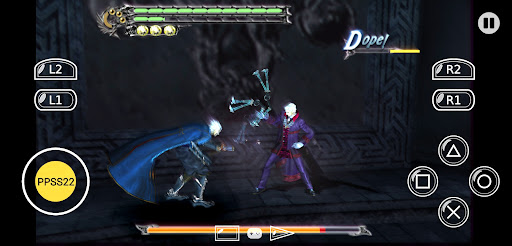
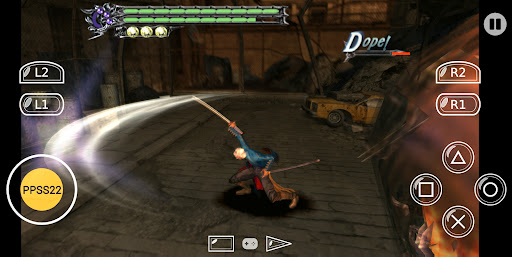
- The button layout can be adjusted and players can customize it at will. It is more humane and has a 100-point personal operation.
- There is an easy-to-use launcher that allows you to easily find the game you want. It's not so cumbersome and quite convenient.
- Advanced image quality settings make the picture more beautiful and immersive, as if you are immersed in the scene.
- Support external handles, which makes playing games more flexible and has a stronger sense of control.
- Updates frequently, adds new features and optimizes stability to ensure that this application is reliable and trustworthy to use.
Who is suitable for?
This Android app is particularly suitable for people who like nostalgic games, especially those who want to play classic PS2 games on their mobile phones. It is particularly popular among tech nerds, aged over 16, who pursue a smooth and memorable gaming experience.
Whether you want to relive classics on your way to and from work, or just want to play anytime, anywhere with a simple simulator, this app will help you easily get it and enjoy PS2 games.
why choose this
This Android app provides a pure gaming experience with stable performance, simple interface and rich features. This powerful simulator solves many compatibility issues and has become one of the first choices for simulation enthusiasts.
Combining advanced features, stability and ease of use, it is a trustworthy solution that is more intimate and user-friendly than many other options, making you have fun and worry.
Top Recommended Alternative
Pros & Cons
Pros
-
Very compatible
-
Performs well on modern equipment
-
Super friendly interface
-
Customizable control
-
Regularly updated and continuously optimized
Cons
-
Limited game support
-
Occasionally they collapse or get stuck
-
Fast power consumption and high resource occupancy
-
Limited graphic customization
-
Newbie configuration is a bit complicated
Advertisement
Download PPSS22 Emulator - PS2 Emulator
FAQ
Is the PPSS22 Emulator safe to use on my device? +
Well, basically as long as you download it from a reliable channel like the Google Play Store, the PPSS22 emulator is basically a safe thing. It has been tested for security and won't damage your equipment or steal your privacy. Don't worry about it.
Afterall, it's a popular Android app that follows Google's security standards. Remember to download it from the official app market at any time so that nothing goes wrong and you can enjoy the game at the same time.
How do I install the PPSS22 Emulator on my Android device? +
Installing this PPSS22 emulator is actually quite simple. Go to the Google Play Store to find it and click on the installation. This Android program is designed quite human-friendly. It can be basically understood at a glance, and there is no headache at all.
Afterinstalling it, you can open it directly and use it and start exploring various functions. It is actually a very reliable PS2 game launcher, allowing friends who like to play games to have a good experience.
What are the main features of the PPSS22 Emulator? +
The PPSS22 simulator brings many useful functions. For example, it has excellent compatibility with PS2 's ISO files, can customize control settings, and is convenient to save progress. The overall operation is smooth and responsive.
Thisapplication-based solution is very popular among people who like to play PS2 games. It has an intuitive interface and is easy to use for beginners. It is a good choice.
Does the PPSS22 Emulator support all PS2 game formats? +
That's right, it supports common PS2 game formats, especially the ISO file set. It has good compatibility, can smoothly run game files in various formats, and the user experience is stable and smooth.
Ifyou want better results, remember to use the correct game file format and ensure format compatibility, so that your game experience can be smoother and you don't have to overturn it if something goes wrong.
Can I use the PPSS22 Emulator without rooting my device? +
Of course! This simulator is designed very carefully. It does not use roots at all, has no technical threshold, and can be used without cracking the mobile phone. Friends who like to play PS2 can give it a try with confidence.
Usingnon-Root devices can also keep your mobile phone safe, the experience is also great, and the potential of the hardware can be fully realized. It's really convenient and safe.
Is the PPSS22 Emulator regularly updated to fix bugs and improve features? +
Yes, simulator developers often push updates, fix some flaws, and add new features, which always improves the user experience and becomes better and better.
Keepingup to date allows you to enjoy the latest performance and compatibility, making playing games smoother and more enjoyable, and you don't have to worry about problems.
Are there any safety concerns when downloading the PPSS22 Emulator? +
As long as you download from regular channels, such as the Google Play Store, there is no big security problem. Be sure that the application comes from a regular developer to avoid being cheated or downloading something with a virus.
Inthis way, the overall situation is very safe, you don't have to worry about privacy or equipment being damaged, you can feel at ease to have fun, and a safe choice is also very important.
What should I do if the emulator crashes or runs into issues? +
If you encounter a crash or a problem, try updating the application first. Sometimes this will happen when the version is wrong or there are too many bugs, let alone cleaning up the cache and data, which can solve a lot of troubles.
Ifit doesn't work, check online forums or official support channels. Sometimes official guidance can help you solve big problems. After all, it is a reliable application, and the developers will help to ensure that you can play smoothly.
Customer Reviews
Users appreciate the emulator's smooth performance and automatic configuration when it works, with some calling it a marvel for PS2 nostalgia. Key strengths include easy setup and good graphics on compatible devices. However, many report critical issues: games often show a black screen, fail to detect discs, or run extremely slow. Controller support is a major pain point—wireless and Bluetooth controllers, including V8 and standard gamepads, are frequently unresponsive, and the lack of a right analog stick hinders gameplay. Functionality gaps like inability to save games, no BIOS selection access, and a non-fullscreen display frustrate users. Some praise its features compared to Nethersx2, while others call it a scam or cite a Trojan detection. Performance is generally good but can suffer occasional choppy frame rates, and the menu interface is considered less polished than DuckStation. Overall, the app divides users: a few get a flawless experience, but most encounter deal-breaking bugs.
Write a Review
Share your experience with PPSS22 Emulator - PS2 Emulator. Submissions are reviewed before publishing.
You Might Also Like
More apps you may want to try next.