

Meeting - Video Conference
Advertisement
Screenshots






Advertisement
About Meeting - Video Conference
This meeting-video conferencing mobile app is quite reliable and is specially designed for seamless virtual meetings and collaboration. It can be used on Android, and the operation is quite intuitive. It can easily handle video conferencing, screen sharing, etc., and connect with team members at any time. The interface is friendly and smooth to use, making it easy for both work and personal communication.
Overview
core functions
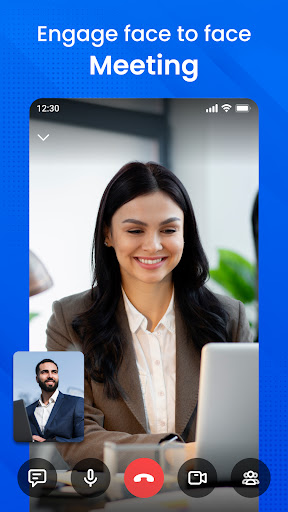
- This software has great video and audio conferencing functions, and online meetings are so smooth that people don't feel stuck at all.
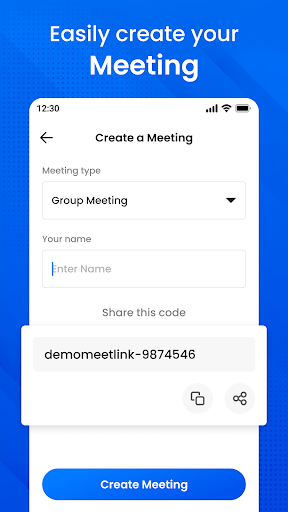
- Users can easily arrange, join, and manage meetings, and calendar synchronization is done in one piece, which is quite convenient.
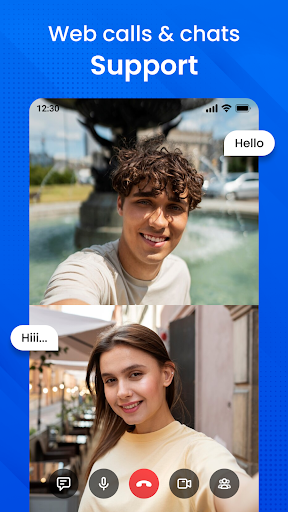
- Real-time chat support allows you to send messages at any time during a meeting without having to take out other tools.
- Screen sharing and collaboration tools make teamwork more efficient and meetings less rigid.
- Security measures in the conference room are in place, password protected, and data is encrypted, so privacy is guaranteed.
- Offline mode allows you to view meeting content and previous recordings without the Internet, which is quite practical.
- Push notifications keep reminding you whether there are upcoming or ongoing meetings, and the information will not be missed.
- The interface is super friendly and the operation is intuitive, so you don't have to worry about newbies not knowing how to use it.
applicable population
This mobile software is especially suitable for professionals, remote teams and business users who need stable video conferencing. It is very reliable to use.
The interface is simple and intuitive, especially suitable for those who want to use an efficient and convenient App to solve meeting problems, whether it is daily team inspections or customer presentations.
Why choose this App
This Android app provides a wealth of features to ensure that your virtual meetings are smooth and have a great experience.
As a trustworthy meeting tool, it solves many common problems. It is safe, easy to use, and has rich functions, making it especially suitable for busy professionals.
Top Recommended Alternative

Pros & Cons
Pros
- intuitive user interface
- High-definition video and audio
- Powerful screen sharing function
- The safety performance is great
- support multiple platforms
Cons
- Free meeting time is limited
- Occasionally the connection is unstable
- You need to register an account to use it
- There are not many annotation tools during the presentation
- Some advanced features are subject to payment
Advertisement
Download Meeting - Video Conference

FAQ
Is the Meeting - Video Conference app safe to use on my device?+
This Meeting-video conferencing application is quite secure, and developers attach great importance to user privacy and security. They all abide by strict security standards to ensure that your data and chat content are protected.
As a mature application, it updates functions from time to time to remove potential vulnerabilities. It's quite safe to use. Whether it's a business meeting or an online collaboration, it's quite reliable on Android devices.
How do I install the Meeting - Video Conference app on my phone?+
It's actually quite simple to install this Android conferencing app on your mobile phone. Go directly to the Google Play store to search for the name, then click the install button, and wait for a while.
After installing it, open an application and register an account. The operating interface is quite friendly and it is easy for novices to use. To put it bluntly, it makes it easy for you to join or host a video conference without any difficulty.
What features does the Meeting - Video Conference app offer?+
In terms of functions, it is quite rich, including high-definition video calls, screen sharing, Group chats, and can also be connected to calendars. These all help you stay connected on your mobile phone and collaborate more smoothly.
As an all-round application, it can also support multi-person participation, meeting recording, and is compatible with a variety of devices. For companies, if they want to communicate remotely efficiently, this model is definitely a reliable choice.
Can I use the Meeting - Video Conference app on other platforms besides Android?+
Currently, the main version of this Meeting is only available on Android and can be downloaded and installed through Google Play. No news about iOS or other platforms has been confirmed yet.
Friends who use Android can expect a smoother experience, and the functions are tailor-made for mobile business meetings. Maybe other platform versions will be launched in the future. Let's wait and see.
How user-friendly is the Meeting - Video Conference app for new users?+
The app is designed to be simple and intuitive, and novices can quickly understand how to join or host meetings. The goal is to allow everyone to get started without difficulty and the experience is smooth and unimpeded.
Therefore, the learning cost is low and the operation is not complicated. Basically, you can get it done quickly with a little bit of effort, saving your heart and effort. The functions are clearly arranged, allowing you to focus on the meeting content without worrying about cumbersome operations.
Does the Meeting - Video Conference app require an internet connection to work?+
Of course, this mobile conferencing application must have a stable network connection to work properly. Whether it's Wi-Fi or mobile data, as long as you are connected, you can enter meetings and share content normally.
If the network is stable, the experience will be better and there will be fewer delays and drops, especially during important business calls. It's really a great tool for telecommuting and online collaboration. Just imagine it!
Are there any privacy controls in the Meeting - Video Conference app?+
Some, there is permission control in the app, and you can adjust the permissions of the camera, microphone and notification yourself. You can choose who can watch your live video and who can hear your voice. Be careful and ensure your safety.
These features can also help you build trust and ensure that your business communications are private and trustworthy. As a mature application, it will prioritize your privacy and make your online meetings safe and secure.
What should I do if I encounter technical issues with the app?+
What should I do if I encounter technical problems? First check whether the device's network is stable or updated to the latest version of the application. Occasionally restarting the app or mobile phone will solve many minor problems.
If that doesn't work, check the official help document or support website, where you will find the answer. As a trustworthy application, the development team will continue to push updates, fix bugs, and help you optimize your experience. They are quite responsible for any problems.
Customer Reviews
Users generally appreciate Meeting - Video Conference for its ease of use, friendly interface, and helpful features that enable seamless remote participation. Many highlight the platform's ability to foster meaningful connections and professional interactions. However, several users report persistent issues with connectivity—such as being unable to connect speakers or join conferences despite multiple attempts. While some find the overall quality and service satisfactory, others criticize the lack of detailed account instructions and failures in core functions like meeting creation and payment processing. A minority also note the presence of misleading or click-bait content. Overall, the app receives praise for its potential but suffers from inconsistent performance and support gaps.
Write a Review
Share your experience with Meeting - Video Conference. Submissions are reviewed before publishing.
You Might Also Like
More apps you may want to try next.



