EasyRecover - Restore All
Screenshots



About EasyRecover - Restore All
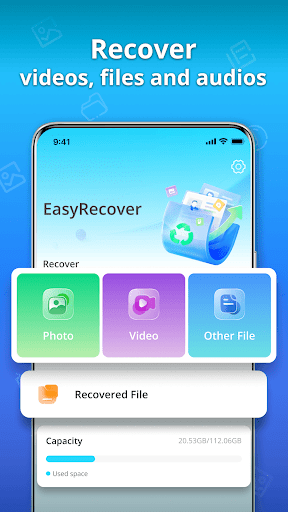
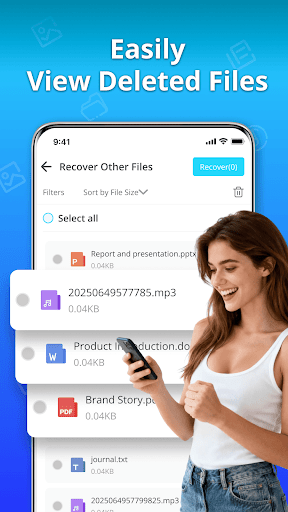
EasyRecover - Restore All is a super reliable tool-based mobile phone software that helps you easily retrieve accidentally deleted photos, videos and various files. As a very friendly Android app, it is really smooth to use and has a simple and clear interface that allows you to operate without having a headache. Whether you want a quick recovery or a complete repair, this software provides a bunch of functions to help you get everything done efficiently. It's really practical.
Overview
core functions
- Smart photo and video recovery can thoroughly scan your device and quickly help you retrieve deleted files. It feels particularly amazing!
- Supports internal storage and SD card storage, covering almost all media types on your Android device, making it safe and reliable.
- The interface is particularly friendly and has step-by-step guidance. Whether you are a technical nerd or not, you can easily use it and feel very considerate.
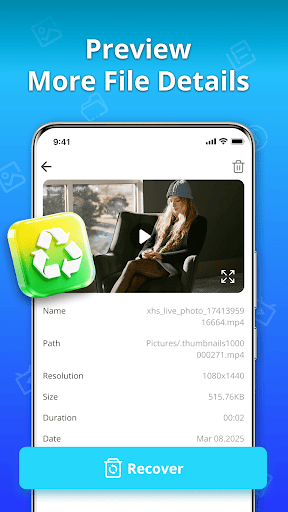
- You can preview files that can still be retrieved in real time, helping you accurately select what you really need without unnecessary worries.
- The recovery process is safe and private, without a ROOT mobile phone and no need to worry about privacy issues. It is quite guaranteed.
- The very lightweight launcher application runs without jamming in the background, and will not slow down your device, and the experience is smooth.
- You can retrieve all media at one time, or you can choose on demand. The functions are very flexible to meet different needs.
Who is suitable for?
This app is especially suitable for friends who use Android phones and want an easier way to retrieve lost photos and videos. Whether you are a technical enthusiast or a novice, you can easily handle it. It's really convenient!
Accidentally deleted the wrong file? Or is there something wrong with my mobile phone? It doesn't matter, this app helps you quickly rescue important media and is very reliable. You need a good helper that is easy to use and can handle media recovery. It is absolutely suitable!
why this
The reason why this Android app stands out is that it recovers quickly and the interface is particularly intuitive. It must be liked! It is also very comprehensive, allowing you to easily recover files without any trouble.
Especially to solve problems caused by accidental deletion or data corruption, it has become very trustworthy. The simple and effective recovery method makes it one of the best options for similar applications!
Top Recommended Alternative

Pros & Cons
Pros
- effective data recovery
- Super friendly interface
- Supports multiple file formats
- Preview before recovery
- Supports multiple storage devices
Cons
- Free recovery limited
- Large hard disk scanning is too slow
- Occasionally false positives
- Poor support for encrypted files
- Focus on Windows, and the Mac version is still under development
Download EasyRecover - Restore All

FAQ
Is EasyRecover - Restore All safe to use on my Android device?+
Well, EasyRecover - Restore All is very thoughtful and safe. It uses some reliable methods to help you retrieve accidentally deleted photos and files without putting your device at any risk. The feedback from users is also quite positive, and the updates are quite diligent and feel quite reliable.
Asan Android app, it adheres to Google's security standards to ensure your privacy is not compromised. Remember to download unofficial versions from official channels. In short, follow the suggestions and the device will be safe.
How do I install EasyRecover on my phone?+
It's actually quite simple to use this application. Open the Google Play Store, find EasyRecover - Restore All, and then click Install. The interface is designed very intuitive, and you can basically understand how to install it at a glance.
Ifyou are using an Android phone, you may have to first allow "unknown source" installation permissions. After installation, follow the prompts and grant the necessary permissions, so that it will be smooth to use.
Can I restore specific types of files with EasyRecover?+
Of course, EasyRecover - Restore All is good at restoring various file types, such as photos, videos, and documents. Its deep scanning algorithm is quite powerful and can help you efficiently retrieve files stored on your mobile phone or SD card.
ThisAPP solution is especially suitable for people who need to quickly retrieve lost pictures or other data. It is smooth and efficient to operate and has a first-class experience.
Does EasyRecover work on all Android versions?+
Basically adapts to most of the latest Android versions, allowing more users to use its functions. It is recommended that you check the specific version instructions on Google Play to confirm whether they are suitable for your device.
Ofcourse, the newer version of Android may have some security mechanisms and require additional authorization, but overall, as long as the device supports it, the functions are quite reliable.
How long does it take to recover files using EasyRecover?+
This depends on the file size and scan depth. Generally speaking, the software has a quick scanning function, which allows you to retrieve photos and videos quickly, which is efficient.
Ifthere are too many documents, it may take some time, but the whole process is quite clear and you can use them with confidence.
Is EasyRecover suitable for beginners?+
Of course, EasyRecover - Restore All is actually quite friendly and is for novices. The interface is simple and the operation steps are clear and clear, so you don't have to worry about not understanding it.
Clearoperating tips and automatic scanning allow you to restore files without professional skills. The experience is smooth and stress-free.
Can EasyRecover restore data from a formatted phone?+
Well, it depends on the situation. Although it is quite powerful, whether it can succeed still depends on whether the data is overwritten. If the data has not been overwritten by something new, the chances of recovery are greater. The sooner the better, the sooner you try, the better it will be.
Becareful when using it, follow the instructions, try not to use your phone to do other things, and ensure that the data is not disturbed. This APP is trusted by many users, especially when there is an urgent need to retrieve data.
Is there a recommendation for how to use EasyRecover effectively?+
To use EasyRecover - Restore All efficiently, the first step is to stop using your phone casually, such as not saving new files to avoid overwriting lost data. Try fast scanning first, and if the results are not satisfactory, try deep scanning again. It may be better.
Inaddition, the mobile phone needs to make room to ensure sufficient storage, and the software needs to be updated, so that the possibility of success will be greater. Using this software is quite reliable and can help you solve a lot of troubles.
You Might Also Like
More apps you may want to try next.