Delete apps - Easy Uninstall
Advertisement
Screenshots
Advertisement
About Delete apps - Easy Uninstall
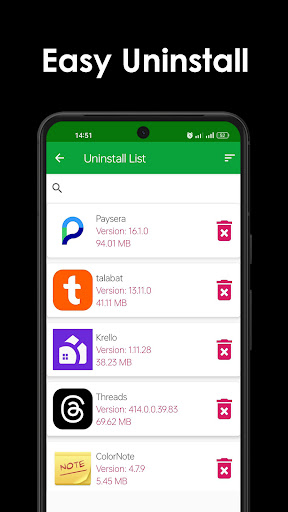
Delete apps-Simple uninstall is a very useful Android app that helps you easily get rid of software you don't want. The interface looks intuitive and is easy to operate. It can be done in a few clicks and won't be as strenuous as other cumbersome management tools. Whether you want to make room or organize the programs on your phone, this unloader can help you smoothly remove annoying applications. The whole process is smooth and not so much trouble.
Overview
core features
- This software interface is simple and intuitive, and it is very easy to use. It is easy to store the device, and there is no pressure to delete applications that are no longer in use.
- It will also analyze each application in detail to help you find the batch of applications that take up a lot of space or are used less, and figure out which ones can be deleted to rest assured.
- The real-time scanning function allows you to immediately find unused applications in the blink of an eye and uninstall them decisively, saving trouble and worry.
- The automatic backup option can back up important data first. When you uninstall the application, you are no longer afraid of losing data, and you are particularly at ease.
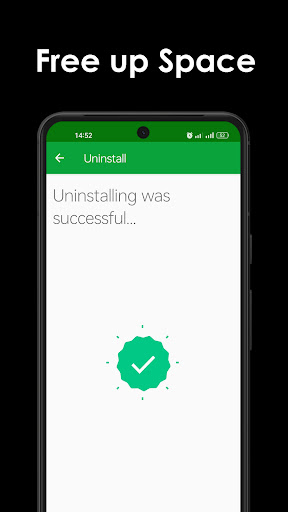
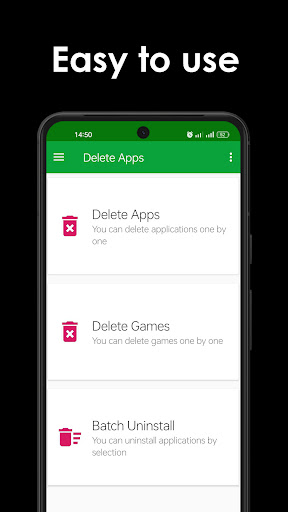
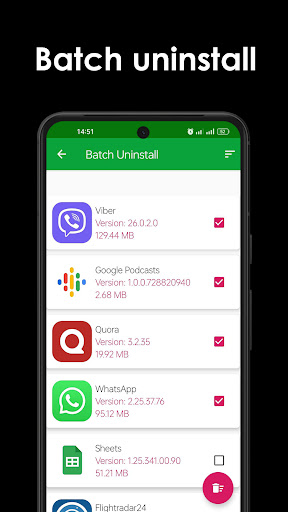
- Support batch uninstallation. Want to clear many applications at once? It was done easily, and a large area of space was instantly freed up.
- It will also tell you in detail the size, usage time, permissions of the application, etc., so that you can have evidence to follow and make a smarter decision without hesitation.
- Comes with a launcher function, which allows you to access quickly and directly from the main screen, making it particularly convenient to manage applications, so you don't have to click everywhere.
Who is suitable for?
This Android software is especially suitable for those who want to make their mobile phones run faster and have more space. Whether you are a technology enthusiast or an ordinary user, it can give you a reliable solution to help you easily get things done with apps.
Whether you are a student, a professional, or an elderly person who wants to uninstall spam apps and manage your phone easily, this thing can help you make your phone smoother and have a better experience.
Why choose it?
This Android app is known for its user-friendly design and rich features. It helps you easily organize your phone. It's a little helper. The efficiency is quite high, and it is specially tailored for users who want to manage applications reliably.
Its highlight is that it can accurately identify unused applications, but also attaches importance to privacy and security, and can be completely trusted. With it, the phone will run smoothly and the experience will be more pleasant.
Top Recommended Alternative

Pros & Cons
Pros
- user-friendly interface
- Support batch uninstallation
- Recommended cleaning of residual documents
- fast
- non-root
Cons
- Incomplete database
- Free version has ads
- Residual documents are not completely cleaned up
- Misoperation unloading
- Updates not frequently enough
Advertisement
Download Delete apps - Easy Uninstall

FAQ
Delete apps-Is this thing safe to uninstall easily on my Android device?+
Of course, deleting apps-easily uninstalling is quite reliable, and it is a good helper to help you quickly get rid of unnecessary apps. When it comes to security, don't worry. User reviews are quite high and it also meets Android security standards.
Frequent updates and transparent rights management make it reliable in storage cleanup and improving device performance. Remember to download and install it from official channels. Security and experience will be guaranteed.
How to uninstall an application with this launcher?+
It's pretty simple, open and delete apps-easily uninstall, and then browse the apps installed on your device. The interface is very intuitive, whether it comes with the system or installs it yourself, it can be easily handled, making it easy to uninstall.
Its operating process is very considerate. Each step is guided by one. You don't have to worry about not understanding it the first time you use it. You can drive away useless applications smoothly. For friends who want to make room and organize their mobile phones, this tool is really efficient!
Can this mobile app be compatible with different Android versions?+
No problem, delete apps-Easy uninstall supports almost most Android versions. It is well designed, so no matter which version you use, you can use it smoothly, ensuring that everyone's experience is basically the same.
This is one of the reasons why it is durable and has a wide range of adaptability. Remember to check the adaptation of the latest version every time you update it, so that you can use it with more peace of mind.
Can I use this to uninstall system applications?+
Well, although it can help you uninstall some applications, unless you have root privileges, it is not recommended to do it casually, because there may be trouble. It mainly recommends that you uninstall the applications you install, which is safer.
If you have to develop system applications, you have to be careful. If you do it well, it may affect the stability of your phone. Most people use it to help manage their applications, which makes it a lot of space and improves device performance.
Can this app help me improve the performance of my phone?+
Of course! Delete apps-Easy to uninstall. The popular Android software can help you quickly clean up unused or useless apps. While freeing up space, it also allows your phone to run faster, last longer, and everything is much smoother.
If you use this tool frequently, your mobile phone will not be messy, and the user experience will be more comfortable, and you will feel much happier to use it. Try this, the performance of the phone will meet your requirements!
Will my personal privacy be safe with this software?+
Don't worry, deleting apps-easy uninstall pays attention to privacy and security. The permissions it applies for are only used when managing applications, and will not joke with your personal data.
With reliable software from regular developers, your sense of security will be more guaranteed. Remember to check the permission settings before using it and confirm that the authorization is only within the range you can accept, and you will feel more at ease.
How often will this software be updated? Can you fix bugs or add new features?+
Developers are working hard and will gradually release updates to optimize functions and fix flaws. With these updates, the software will definitely become more stable and secure, making it easier for you to use.
Keeping the latest version can also experience new features and enjoy a better user experience. It is recommended to check it frequently and keep the software up to date so that it can be more assured to use it.
Can this software work on the iPhone? Or is it only effective for Android?+
This can only be used on Android devices. It is specially designed for Android and uses the features of the Android system to uninstall applications. You can't use this on your iPhone or iOS devices.
If you want to do something similar on your iPhone, you'll have to find other iOS compatible tools. For Android users, deleting apps-easy uninstall is a reliable and convenient helper, and there is no pressure to manage apps!
Customer Reviews
Users generally praise Delete Apps - Easy Uninstall for its simplicity and effectiveness in removing stubborn or pre-installed apps that other methods cannot handle. Many find it user-friendly, fast, and reliable, with several long-time users reporting consistent performance. However, some users encounter issues: the app may fail to delete certain applications (e.g., 'todo mAil'), and ads can be intrusive. Compatibility problems are also reported, with some devices showing the app as unsupported. While many appreciate its straightforward approach, a minority find it useless or poorly designed, especially when it cannot remove apps that appear shaded or repeatedly reinstall. Overall, it is a helpful tool for most, but its effectiveness depends on the specific device and app restrictions.
Write a Review
Share your experience with Delete apps - Easy Uninstall. Submissions are reviewed before publishing.
You Might Also Like
More apps you may want to try next.