
Video Download
Advertisement
Screenshots
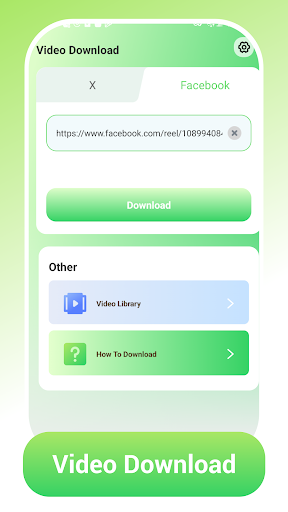
Advertisement
About Video Download
Video Download is a sweet Android app designed for those who want to quickly and easily save videos from a variety of online sources. It's really smooth to use and has quite reliable functions. It can help you easily download and manage videos. The overall experience is quite smooth. As a leader in the video player and editing category, it provides a very straightforward solution for friends who need to save videos directly to their mobile phones.
Overview
core functions
- This application interface is particularly intuitive, making it easy to download videos so fast that it is easy for anyone to use it.
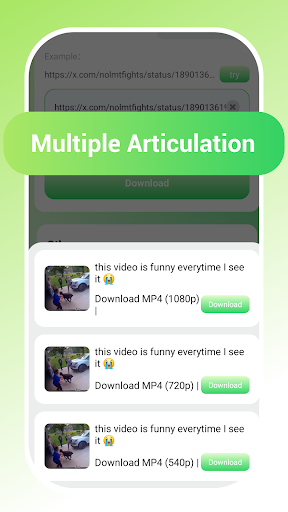
- It supports a variety of video formats and definitions, and can basically meet different devices and personal preferences, with a dazzling variety of choices.
- You can also save videos and watch them offline. It's especially convenient when the Internet is bad or in other places, and you no longer have to worry about no traffic.
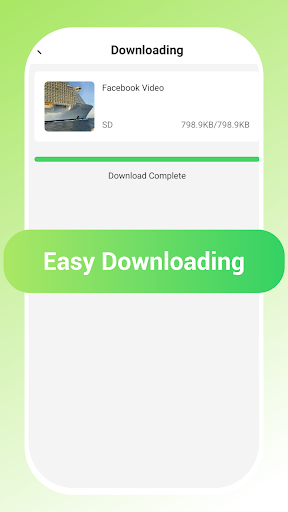
- Display the download progress in real time, so you can know exactly when you are halfway through the download, so you don't have to stare at the crazy swiping status anymore.
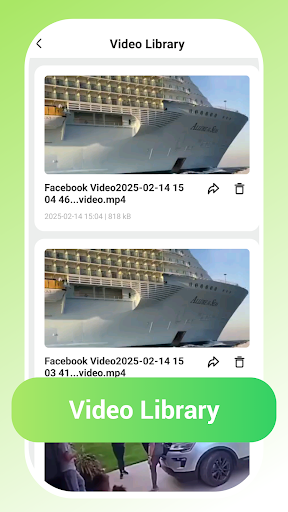
- The built-in video management tool is super convenient to organize, change names, and delete. You can do whatever you like, which is simple and flexible.
- There are no annoying advertisements, no interruption to every second of watching videos and downloading, and the experience is extremely smooth.
- It can also automatically detect video links on browsers or social media, making capturing content as easy as climbing, without any effort!
Who is this app suitable for?
Designed for those who often watch videos on Android devices and want to download videos, especially media nerds or content creators.
Whether you want to save some of your favorite videos offline or easily manage a large content library, this application-based solution will give you a smooth and comfortable experience and meet all your needs.
Why choose this app
With its user-friendly interface and functions, this Android app makes video downloading and management super simple, saving you a lot of time and effort.
It gives you a feeling of safety and solves the common troubles of slow downloads and unclear operations. Whether you are video enthusiasts or ordinary users, you can use it with confidence. It is a trustworthy first choice!
Top Recommended Alternative
Pros & Cons
Pros
-
High download speed
-
Supports multiple formats
-
The operating interface is very friendly
-
It can also be downloaded in batches.
-
Built-in video converter
Cons
-
It plays ads when it's in use.
-
Free version downloads have limited clarity
-
Some videos are not considered and may be restricted by DRM
-
There is no beta version of cloud upload yet
-
Not very stable on old equipment
Advertisement
Download Video Download
FAQ
Is Video Download safe to install on my device? +
Well, basically, the mobile application Video Download is quite safe to download from reliable channels, which means official platforms such as the Google Play Store. It has gone through safety testing to basically ensure that you can use it with peace of mind and will not cause any trouble to the equipment.
Ofcourse, you still have to pay attention to the permission application, read the comments, etc., and make sure there are no strange permissions before you dare to use it. As a developer who has been working on apps for many years, I have to say that what we are most concerned about is the data security and privacy of users, and strive to create trustworthy applications and give users a peace of mind experience.
How do I update the Video Download app to the latest version? +
If you want to upgrade, it's actually very simple. Just go to the Google Play Store and find your Video Download. Clicking will usually prompt you that there is a new version. The system will tell you if there are new versions waiting for you to update, which is quite convenient.
Keepingthe application up to date, using the latest features, and making it safer, especially some security fixes or Bug fixes. Updating frequently can make your experience better, and both launchers and media management tools are indispensable.
Can I use Video Download on multiple devices? +
Yes, as long as you log in with the same account, you can basically sync between multiple devices. This APP is relatively flexible to use and can be used on different Android devices. It is quite convenient.
However, pay attention to the synchronization of accounts and data, and don't lose the videos and preferences you downloaded. In this way, using multiple devices to manage media will make the overall experience smoother and a very considerate design.
Does Video Download support all video formats? +
It supports quite a number of formats, such as MP4, AVI, etc., and offline seems very convenient to save videos. It is also quite rich in functions, and can handle basic commonly used formats.
Ifyou encounter some weird formats that cannot be played, see if the latest version of the APP support has increased compatibility. A trustworthy application, originally designed to meet the needs of most users, is quite comprehensive.
How do I resolve installation issues with Video Download? +
If you encounter problems with installation, you must first confirm whether the storage space on your device is enough, and then make sure you downloaded it from an official channel, such as the Google Play Store.
Tryrestarting your device or clearing the Google Play Store cache to solve the problem. These methods are more reliable and can help you install the application smoothly and ensure that subsequent use will be fine.
Is Video Download suitable for beginners? +
Of course, the interface is very friendly and is definitely suitable for newcomers or users with little experience. The simple and clear operation design allows you to quickly figure out how to use it, and video management is also very convenient.
Whetheror not you are trying to download a tool or player for the first time, this application will let you get started smoothly. There is no complicated operation process, and the user experience is quite good and user-friendly.
Can I customize settings within Video Download? +
Yes, there are some adjustable settings in the application, such as download quality, storage path, notification reminders, etc., which can be adjusted by yourself. This time, the operating space will be large and you can use it according to your own habits.
Inthis way, the entire media management becomes more flexible, and it is up to you to decide where the video is stored and how to notify it. It is quite convenient, and it is also a highlight of this application.
What do I do if I forget my login details? +
If you forget your login information, you can look for options to retrieve your account in the app, or try it on the official website. It can usually be done through actions such as email verification and password reset.
Asdevelopers, we ensure that the login process is secure so that you can use it with confidence. Restoring accounts is usually quick and won't take too much time. Just continue to use this reliable application happily.
Customer Reviews
Users generally praise Video Download for its high quality and performance, with many calling it 'excellent,' 'very good,' and 'recommendable.' However, key concerns emerge: advertisements are frequent and required to unlock content, frustrating some users. Functionality issues are noted—while many find the app works perfectly, others report videos not appearing or being redirected to download irrelevant content. Stability also divides opinions: some enjoy smooth operation, while others experience sudden failures like 'no cable' errors. Overall, it's a solid downloader with trade-offs in ad frequency and reliability.
Write a Review
Share your experience with Video Download. Submissions are reviewed before publishing.
You Might Also Like
More apps you may want to try next.




