
TeamSpeak 3 - Voice Chat
Screenshots
About TeamSpeak 3 - Voice Chat
TeamSpeak 3 - Voice Chat, this communication software is really reliable, specially designed for people who want smooth voice chat. It's popular among gamers, teams and various communities, and it's a good choice. This multi-functional mobile application has a simple interface and powerful features, which can greatly enhance the real-time communication experience on Android phones and other devices. It has always focused on making users feel comfortable and ensuring that they can easily connect to the Internet no matter where they are. It's really convenient!
Overview
Core Features
- The voice calls of this software are very good, the voice is as clear as crystal, and the team cooperates very smoothly and there is no pressure at all.
- Support real-time chat and button call functions, making it particularly convenient for you to communicate in games or at work, and respond in time anytime, anywhere.
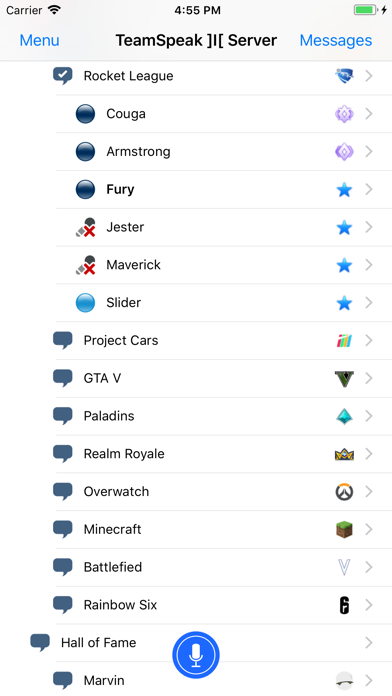
- You can also customize server settings, so that you can easily create and manage voice channels. The operation is unbelievably simple.
- The built-in security is great, ensuring that the call content is encrypted, privacy is guaranteed, and everyone can use it with confidence.
- Compatible with multiple platforms, whether it is Android or other mobile devices, it can be used smoothly, the experience is consistent, and the design is quite considerate.
- It can also be linked with third-party applications or robots, making it more functional and is the best choice for finding communication tools.
- Push notifications are timely reminders so that you won't miss any messages or calls, and are less disruptive and practical.
Who This App Is For
This mobile app is particularly suitable for gamers, remote work teams, or groups that need clear voice communication, especially Android users. The interface is easy to use, and whether you are a technical enthusiast or a novice, you can find reliable chat tools.
Whether it's a collaborative project or a multiplayer game, this software helps you stay connected, feel stable and safe, and meets all your daily communication needs.
Why Choose This App
The highlight of this Android software is that it focuses on high-quality voice chat, has comprehensive functions, and smooth operation, just to provide users with an excellent experience. Strong security and support for multiple platforms make team communication more assured.
To solve common communication problems, it is a trustworthy and easy-to-use communication platform with high cost performance and is definitely a good choice among similar apps.
Top Recommended Alternative

Pros & Cons
Pros
- High-quality voice communication
- Strong server foundation and personalized settings
- Super cross-platform compatibility, supporting a variety of devices
- Privacy and security measures in place
- Ultra-low resource occupancy
Cons
- The interface is a bit backward and feels not novel enough
- Built-in multimedia support is not rich enough
- The mobile version is sometimes not stable enough
- Newbies may find the settings a bit complicated
- Strong reliance on server stability
Download TeamSpeak 3 - Voice Chat


FAQ
How do I log into TeamSpeak 3 - Voice Chat on my mobile device?+
Is TeamSpeak 3 compatible with all devices, and how do I install it?+
Are there any safety concerns when using the TeamSpeak 3 app?+
What are the main features of the TeamSpeak 3 - Voice Chat app?+
Can I use TeamSpeak 3 as an app based solution for gaming needs?+
Does the app support offline mode or do I need an internet connection?+
What makes TeamSpeak 3 a trustworthy choice among communication apps?+
Is there a way to customize the app's settings to improve my app experience?+
You Might Also Like
More apps you may want to try next.