
Photo Studio: Photo Editor App
Advertisement
Screenshots
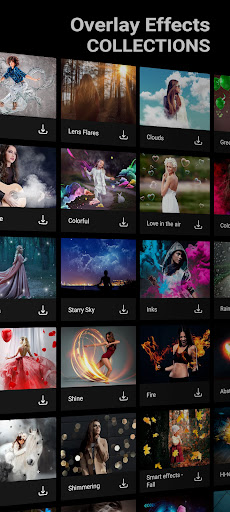

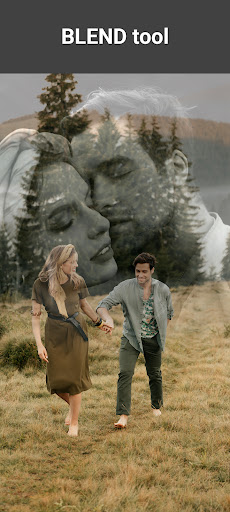

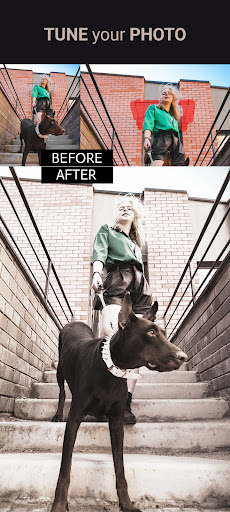
Advertisement
About Photo Studio: Photo Editor App
Photo Studio: Edit Photos App is actually a super practical mobile phone retouching artifact! Its functions are really surprisingly rich. Whether you are a casual photographer or a professional photographer, you can find what you want on it. This Android application interface is particularly friendly and easy to use. Coupled with a bunch of powerful editing tools, it is simply the best helper to help you turn photos into works of art. When you use it, you can always bring that sense of accomplishment and small excitement, and make your photos instantly glow with a different luster!
Overview
core functions
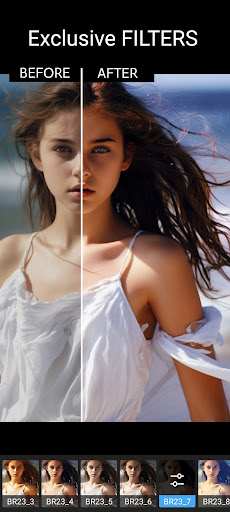
- Simple and intuitive photo editing tool allows you to easily beautify your pictures with filters, cropping and adjustments without worrying about cumbersome operations.
- Built-in collage making and layout options help you quickly compose beautiful photos with immediate results.
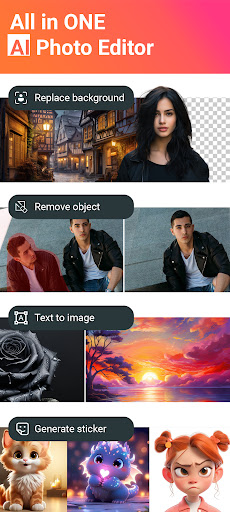
- Advanced functions like background removal and retouching can help you achieve professional results. It's really not easy.
- The batch editing function greatly improves your efficiency and can be used whether you are a photographer or a social user.
- Offline mode allows you to edit pictures without networking at all. It is quite reliable in various scenarios, worry-free and convenient.
- Real-time preview is to let you see the changes first and then decide to save or share. There is no delay, it is intuitive and refreshing.
- You can also seamlessly connect your device photo album and social platform, making sharing super simple, and you can post it whenever you want, without any effort.
Who is this App suitable for?
This mobile app is especially suitable for amateur photographers, social media users or ordinary editing enthusiasts, over the age of 13, who can use it if they want to get high-quality photos quickly. It's really an easy-to-use APP solution, so you don't have to worry about learning too hard and it's easy to get done.
Whether you're preparing photos for personal memories, social content or small projects, this app can help you improve your experience. It is suitable for anyone who is looking for a reliable Android photo editing tool and wants a simple and easy-to-use tool.
Why choose this app
This Android software brings a set of powerful features dedicated to making it easy for you to edit high-quality photos. With a friendly interface and powerful tools, it stands out among many editing applications.
It solves many common editing problems and provides quick and intuitive options that allow you to shoot professionally without having to spend too much effort. With stable performance and rich functions, this app is definitely a trustworthy helper for photography enthusiasts and creators.
Top Recommended Alternative

Pros & Cons
Pros
-
Simple and intuitive operation
-
Rich filters and special effects
-
The finished product is great
-
The processing speed is amazing
-
Basic editing tools are free
Cons
-
Fewer high-level functions
-
Occasionally break down
-
Free version with watermark
-
Few export formats
-
Some filters eat too much resources
Advertisement
Download Photo Studio: Photo Editor App
FAQ
Is the Photo Studio: Edit Photos App safe to use on my device? +
Well, basically, Photo Studio: Edit Photos is quite reliable. It is made by some trustworthy developers, and its security is still guaranteed. It strictly adheres to privacy standards and does not collect your personal information for no reason. Remember to download it from the official platform to feel more at ease.
This software has undergone security review and is a reliable photo editing tool. It focuses on protecting user data, provides rich editing functions, and is relatively secure to use, so you can use it with peace of mind.
How do I install the Photo Studio: Edit Photos App on my Android device? +
Installing this Android app is actually quite simple. You just need to search for its name in Google Play, find it, click the Install button, and wait until it is automatically downloaded and installed.
It is a very useful photo editing engine with an intuitive interface. After installation, you can start exploring its various functions and use it to edit photos directly. It is quite convenient.
Does the app offer enough features for professional photo editing? +
This Photo Studio: Edit Photos has quite comprehensive functions. Whether you are just playing around or doing some professional editing, it is enough. There are cropping, filters, retouching, special effects, etc., everything is enough to meet various needs.
Its application-based solution has a smooth experience, can help you make the photos beautiful, and the quality of the finished product is also good. Many users like to use it to quickly retouch drawings or process complex projects, and are accustomed to its many functions.
Can I use the app offline after installing it? +
Of course, after installation, many of Photo Studio: Edit Photos features can be used offline. It can be operated without having to connect to the Internet, which is very convenient. You can continue to edit photos when you are away from home or without the Internet, which is quite flexible.
If you travel frequently, travel, or in places where the network is unstable, it's really convenient to have offline features. Even if you are not connected to the Internet, the user experience is still quite smooth and there is nothing stuck.
How does the app compare to other launcher apps for photo editing? +
This Photo Studio: Edit Photos is a relatively friendly and intuitive photo editing launcher with rich functions. Its interface is simple to operate and can be used quickly by even novices, but the functional level is deep enough to meet the needs of more experienced users.
Compared with some other launchers, this app focuses more on photo editing, is efficient and has a good experience. It combines simplicity with powerful editing tools well and is a good choice for photography enthusiasts to consider. It is both convenient and practical.
Customer Reviews
Users widely praise Photo Studio: Photo Editor App for its powerful editing tools, intuitive interface, and excellent background replacement with adjustable blur effects. The AI-powered features receive particular acclaim for making edits efficient and enjoyable, while the free version offers a generous set of filters, backgrounds, and frames without requiring a subscription. Many long-term users describe it as "the best app" and appreciate its constant improvements. However, opinions diverge on several aspects. Some users find the app straightforward and fun, while others note it is "not entirely straightforward" and requires practice to master. Regarding AI features, most users love them, but a few prefer manual editing and found the erase function useless. The free version is often considered sufficient, but users complain about repetitive and intrusive ads. Performance issues are highlighted by some: rotating fonts become distorted, object removal ruins image resolution, and recent updates caused text labeling to become distorted when saving, leading to frustration among paying subscribers. Additionally, new stickers and unreliable messaging features disappoint some users. Despite these drawbacks, the app remains a top choice for many.
Write a Review
Share your experience with Photo Studio: Photo Editor App. Submissions are reviewed before publishing.
You Might Also Like
More apps you may want to try next.




