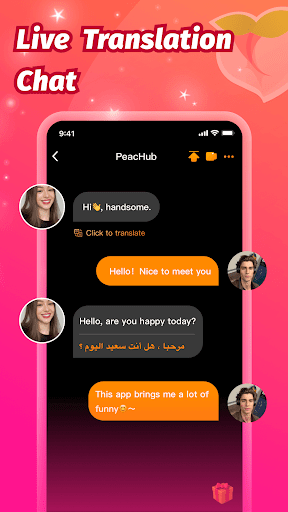
PeacHub - Online Video Chat

PeacHub - Online Video Chat

Experience seamless global connectivity with PeacHub - Online Video Chat. Free this secure, high-quality video chat app and connect worldwide today!

Screenshots

5 images
PeacHub - Online Video Chat screenshot 1PeacHub - Online Video Chat screenshot 2PeacHub - Online Video Chat screenshot 3PeacHub - Online Video Chat screenshot 4PeacHub - Online Video Chat screenshot 5

About PeacHub - Online Video Chat

PeaceHub-Online video chat is a very useful social mobile app that helps people engage in Real-time video conversations. It can be used on Android devices, the interface is particularly pleasing to the eye, and the operation is quite easy. Coupled with the stable connection, there is basically no stuck. Either chatting or contacting friends, PeaceHub is a very reliable choice. It can make your video interactions particularly smooth. I especially like using this app to talk to friends.

Overview

core feature

  • This app has high-quality real-time video and voice chat, and the chat is smooth and fun.
  • It also includes instant messaging and file sharing, so that you can stay in touch at any time without just relying on videos.
  • Supporting two platforms, Android phones are very easy to use. They can switch seamlessly no matter which device they are on, and the experience is very consistent.
  • You can also chat with multiple groups of people, which is especially suitable for cooperation or gatherings of friends. It is super convenient.
  • The privacy settings are in place to ensure chat security, make people feel safe, and data is protected and encrypted.
  • The interface design is quite friendly, very intuitive to use, and the overall experience is improved a lot. It is a very intimate design.
  • Message reminders are updated at any time, so you won't miss any messages or calls, making it easier to use.
  • There is also offline mode, where some functions can be used when the network is not good. It's a very thoughtful design.

Who is this app suitable for?

This mobile app is really suitable for all types of social professionals, remote workers, or people who want to communicate easily through Android. The interface is simple and clear, allowing anyone to start using it. It is also suitable for all ages. If you want to use a reliable tool, you can be carefree.

Whether it's chatting with friends or collaborating on projects, this application-based solution can handle a variety of scenarios, making virtual communication super simple and efficient, and making it particularly easy to use in daily life.

Why choose this app?

This Android app brings a great experience with its powerful features and refreshing interface combination. Not only is the connection smooth, but also pays special attention to privacy and security, solving all common communication problems, and the experience is really great.

Providing reliable and convenient security features and making it a superior alternative to other similar social apps is definitely a smart choice for people who want to find a practical communication tool.

Top Recommended Alternative

Pros & Cons

Pros

  • The operating interface is very friendly
  • HD video smoothness
  • Rich Chat features
  • Strong privacy protection settings
  • Support multiple languages

Cons

  • There are not many ways to find new friends
  • Occasionally crashes during video calls
  • Personal data cannot be customized in detail
  • Limited number of free messages per day
  • Customer service response was a little slow

Download PeacHub - Online Video Chat

You are going to be redirected to the official website to finish the download when you click these buttons above.

FAQ

How to sign in to PeaceHub for the first time-Online Video Chat?+
Getting started with PeaceHub is actually quite easy. After opening the app on your phone, you will see the option to either register for an account or log in using your email or social media account. The entire experience is designed to be very humane and easy to use.
Can PeaceHub be used on both Android and iOS devices?+
Yes, PeaceHub can be downloaded from Google Play as an application for Android phones, but the iOS version is not yet available, so Android friends can use it quite easily for the time being.
What are the main features of PeaceHub?+
This app has rich functions, mainly to facilitate online video chatting and social networking. Including high-definition video calls, instant messaging, and the ability to create and join groups. It also supports real-time notifications to ensure that you don't miss any important conversations. The design is very considerate, the interface is intuitive, and even novices can get started quickly. Whether you're chatting casually or organizing a virtual party, you can meet your various needs.
Is it safe to use PeaceHub? How does it protect my privacy?+
Security is very important on PeaceHub. All video calls and messages are encrypted to ensure the privacy of your conversations. If you have control over sharing information, you can also control it yourself. The app carefully adheres to data privacy standards and strives to make users trust it.
Can I use PeaceHub as a launcher app to facilitate access to social media and contacts?+
Although PeaceHub is mainly used for video chatting and social networking, it can also be used as a launcher to integrate your contacts into it to quickly find friends and groups, so that you don't have to switch between multiple apps, which is super convenient.
Does PeaceHub have any personalized settings?+
Of course there is! You can set avatars, status messages and notification preferences to make the app more tailored to your style. These customization options make the experience smoother, safer, and more secure.
Compared with other social or launcher apps, what are the advantages of PeaceHub?+
The biggest highlight of this app is that it focuses on high-quality video calls, real-time messages, and the interface is particularly easy to use. Some social software separates chat and media things, but PeaceHub integrates them all into one platform, which is very integrated. If you're looking for a reliable communication tool, especially on Android, it's definitely a good choice.
What if I encounter problems or bugs while using PeaceHub?+
If you encounter problems, you can go to Google Play first to check if there are updates. Developers will often push some fixes and optimizations. Rebooting an app or device may also help you solve some common glitches. If the problem persists, you can also contact their customer service through 'help' or official contact information to feedback the problem and ensure that your experience is more reliable.

You Might Also Like

More apps you may want to try next.