
PDF Viewer&Scanner
Advertisement
Screenshots
Advertisement
About PDF Viewer&Scanner
Overview
core feature
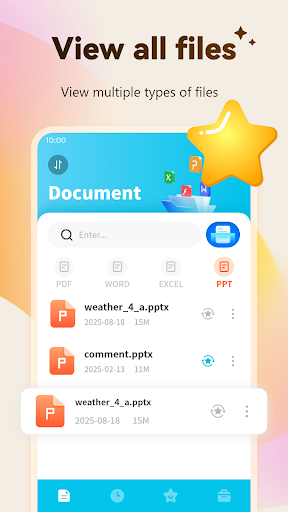
- This application is equipped with a powerful PDF browser, which scrolls smoothly, renders high-definition, and reads documents very clearly and comfortably.
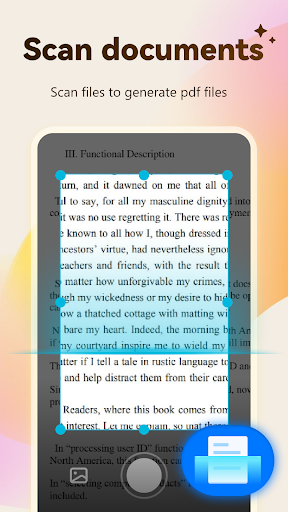
- Built-in scanning tool can quickly help you turn paper materials into electronic PDFs, which is really time-saving and convenient!
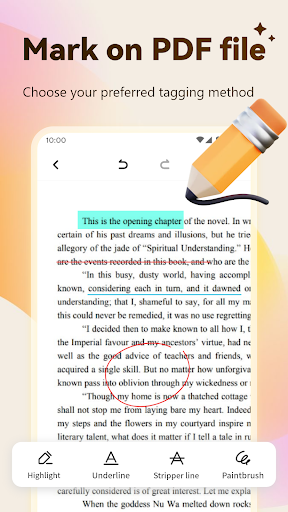
- Support adding annotations to PDFs, editing content, writing comments or marking key points, which is easy to use.
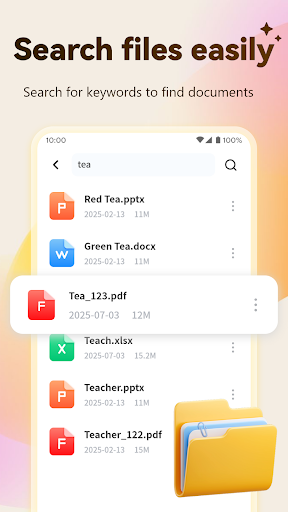
- Provides advanced search functions to help you find information in PDFs, saving you from searching and making everything easier.
- Support offline mode, files can be available at any time, even if there is no network, you don't have to worry.
- Comes with a file management system, you can organize PDF files in the interface, which is orderly and quite worry-free.
- There are also secure file encryption measures to ensure that your privacy is not leaked, which is quite reliable.
- The sharing function is also very convenient. You can quickly send PDF files through email or the cloud, which is very efficient.
Who is suitable for?
This mobile app is mainly built for students, white-collar workers and those who need reliable PDF reading and scanning functions. It is a good helper on Android devices. It provides an excellent solution for users who want to manage electronic data in a convenient application.
Whether you are in the office, school or on the road, this software can help you simplify the document process. It is especially suitable for business people, students or home users who want a multi-functional launcher to efficiently handle PDF and scanning tasks.
Why choose this App
This Android app provides a one-stop solution for reading, scanning and managing PDFs, which is a good choice among similar software. Rich functions make the user experience continue to be smooth and trustworthy.
It pays special attention to user privacy and security, is simple to operate, and has powerful functions. Compared with many competing products, it is obviously more secure. It feels like a reliable and all-round tool that can meet all your document needs.
Top Recommended Alternative
Pros & Cons
Pros
-
Super friendly interface
-
PDF displays particularly clearly
-
The scanning function is very powerful
-
File management is flexible
-
Support cloud synchronization
Cons
-
Not many editing functions
-
Large files can sometimes load slowly
-
Some functions need to be connected to the Internet to be used
-
OCR recognition is sometimes inaccurate
-
Comparison basics of annotation tools
Advertisement
Download PDF Viewer&Scanner
FAQ
Is PDF Viewer&Scanner safe on my Android device? +
Of course, PDF Viewer&Scanner is a very reliable Android app that always puts user safety first. It is updated regularly, fixes various vulnerabilities, and strictly adheres to privacy standards. I feel quite relieved to use it to process documents and so on.
Forsecurity reasons, it is recommended that you only download apps from official channels and don't forget to turn on the security protection features of your device. With this app, the experience is not bad, the performance is stable, documents are safe, and it is quite reliable for daily use.
How can I install PDF Viewer&Scanner on my Android phone? +
It's quite simple. You can do it through the Google Play Store, which is one of the most commonly used download channels on Android devices. Just search for the name, click the install button, and wait for it to come down automatically. It's not complicated.
Thislauncher is quite useful, has a friendly interface, and helps you easily manage files and scan tasks. As soon as you install it, you can experience its various functions immediately, making your document browsing and scanning smoother. You can do it from your Android phone without being cumbersome.
Can PDF Viewer&Scanner support other formats besides PDF? +
Of course, this app is quite versatile. It can support multiple file formats such as JPEG, PNG, TIFF, etc., and basically it can handle all types of documents. Its functions are designed for multiple formats, and the operation is smooth and not difficult at all.
Thisfeature makes it easier for you to use. You don't have to copy it to other software for processing. All files can be processed in this app. Whether it's scanning receipts or viewing pictures, it can help you get it done. It's a great companion.
Can I use PDF Viewer&Scanner offline? +
Absolutely! The best thing about this app is that it supports offline operations, allowing you to view and manage your files even if you don't have the Internet. This is a lifesaver when you are away or when the network is unstable.
Whetherit's a business trip or in a remote area, as long as you carry your phone with you, you can scan, browse, and organize your documents at any time. This feature makes the entire experience smooth and smooth, and the performance is quite reliable no matter when and where.
Can you customize settings to make this app more convenient to use? +
Of course! PDF Viewer&Scanner provides many custom options in the settings, such as adjusting scan quality, selecting default storage locations, configuring display schemes, etc. In this way, it will be more convenient to use and save a lot of time.
Setyour favorite settings for the application to make the operation easier. Especially for people who use it frequently, master these functions quickly and document management becomes more skillful! The design of this app itself is very user-friendly and quick and comfortable to use.
Will this PDF Viewer&Scanner be updated frequently? +
Yes, the development team will regularly release updates to optimize performance, fix vulnerabilities, and add new features. Keeping the software up to date allows you to use better new features, which also means higher security.
Continuousupdates and support not only enhance users 'trust, but also reflect their determination to provide a reliable and practical document scanning and management tool. Use it with confidence, use it with confidence, and the experience is always improving.
Can this app interface with cloud storage services? +
Of course, it supports cloud storage like Google Drive and Dropbox, making it easy for you to share and back up scanned files at any time. In this way, files can be easily accessed, safe and reliable, no matter which device they are on.
Afterconnecting to a cloud service, your file access is particularly flexible and you no longer have to worry about loss or incorrect format. It is very convenient for both individuals and work, and is a very reliable cloud assistant.
Is this PDF Viewer&Scanner suitable for business use? +
Of course! It has high scanning quality, convenient document organization, and can also connect to the cloud. It can be used in office or business situations. For professionals who need to process files quickly, this app is very reliable and provides a stable experience.
Manyusers like its security measures and convenient operation. Whether it's office or remote work, it can help you sort out your processes and effectively manage documents. It's a useful assistant, making your work smoother.
Customer Reviews
Users generally praise PDF Viewer & Scanner for its core functionality, simplicity, and suitability for older users. Key strengths include effective scanning and PDF handling, with many describing it as 'excellent' and 'very good.' However, significant concerns arise around excessive advertising, which some find 'annoying' or 'makes it totally useless.' While many users appreciate the app's performance ('works flawlessly'), others report post-update malfunctions and slow system speed. Some users note deceptive or low-quality ads damaging trust. Overall, the app performs its tasks well, but the intrusive ad experience divides opinions.
Write a Review
Share your experience with PDF Viewer&Scanner. Submissions are reviewed before publishing.
You Might Also Like
More apps you may want to try next.




