Paint my Room - Try wall color
Advertisement
Screenshots
Advertisement
About Paint my Room - Try wall color
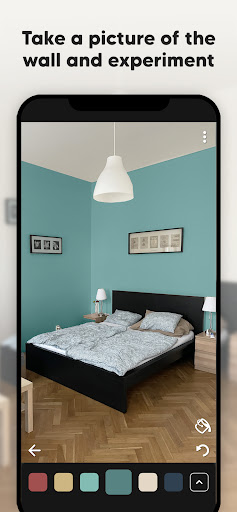
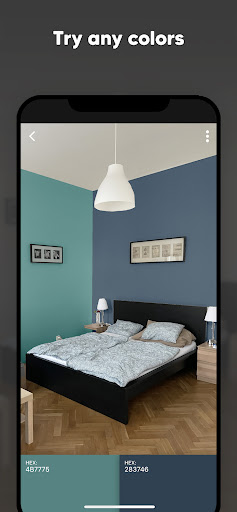
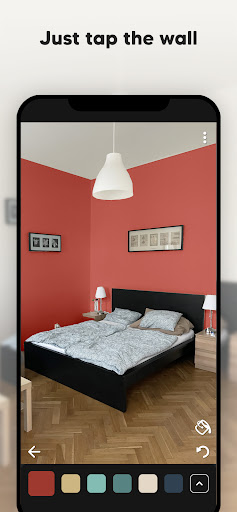
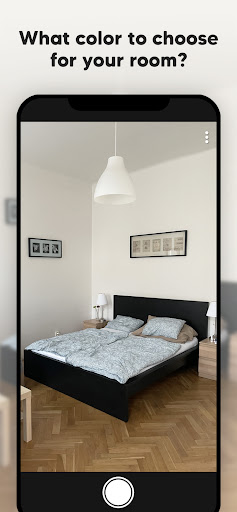
Paint my Room - Try wall color This app is really sweet! It is a user-friendly mobile app that helps homeowners see the different color effects on the walls before starting painting. For example, it is like a magician who will help you test colors, allowing you to see what colors look like on the wall without having to bother. The application interface on this Android is particularly intuitive and doesn't have to be used hard. You can try out various indoor collocation ideas with a click. The purpose of this app solution is to make your experience better. Using it to preview colors can really greatly enhance your decoration mood and effect!
Overview
core functions
- This app interface is particularly intuitive. Users can quickly select colors and instantly see the effect of the walls. The operation is comfortable and easy.
- Try different paint colors with augmented reality, and the experience is overwhelming. Compared with traditional paint color testing, it feels more realistic and makes it more fun to have.
- It also provides a rich color library and search filters, allowing you to easily find the color you like in the bottle, and you can find the right tone whether it is your mood or your room.
- Favorite colors can be automatically saved, and it is super convenient to compare them back. If you want to change them, you can adjust them at any time to see what's going on.
- The built-in color matching tool can also synchronize real-life paint colors to ensure that the color you choose is error-free and reliable.
- You can also see how the color of the walls will change under different lights. The visual effect will be more realistic and help you plan more in place.
- The built-in tutorials allow novices to get started quickly and display the functions in detail, making you feel comfortable and confident.
Who is suitable for?
This mobile app is especially suitable for homeowners, interior designers, or those who want to change the color of the walls to make their home more innovative. Easy to operate and suitable for almost all ages, especially those who are interested in home decoration or like color matching.
Whether you are planning to renovate quickly or are thinking about how to make a major renovation, this app will help you visually see the results in advance, saving you from having to spend a long time wondering how the results will be. It allows you to choose colors easily, conveniently and practically without having to try and make mistakes over and over again.
Why choose this APP
This Android app is particularly good. It not only has a smooth experience, but also has powerful features to help you easily make color choices. It really helps you see the paint color accurately and easily on your mobile phone, which is practical and saves trouble.
Compared with other options, it is more considerate, such as utility tools such as light simulation and color matching, which are both reliable and all-round, and can fully meet your various wall coloring needs. Moreover, it focuses on user experience and has very reliable functions. It is really a good helper for home decoration color plans.
Top Recommended Alternative

Pros & Cons
Pros
-
Real color preview
-
Rich color options
-
The operating interface is very friendly
-
High-quality image processing
-
Virtual color testing is super convenient
Cons
-
Limited room size adjustment
-
Unstable color accuracy
-
No texture simulation of wall materials
-
Limited export options
-
High requirements for photo quality
Advertisement
Download Paint my Room - Try wall color
FAQ
How do I install and start using Paint my Room - Try wall color? +
Is Paint my Room suitable for both Android and iOS devices? +
Are the app features free, or are there in-app purchases? +
Is the app safe to use on my device? +
What makes Paint my Room - Try wall color stand out among other launcher apps? +
Can I use the app to see how different colors look in my room? +
How well does the app perform in terms of accuracy and responsiveness? +
Is the app difficult to navigate for new users? +
Does Paint my Room - Try wall color support all types of wallpapers and paints? +
Can I save or share my wall color ideas directly from the app? +
Is the app regularly updated with new features? +
What should I do if I encounter technical issues? +
Is it necessary to have advanced technical skills to use Paint my Room effectively? +
Can I use Paint my Room without an internet connection? +
How accurate are the color representations in the app? +
Are there any tips for getting the most out of this app on my Android device? +
Customer Reviews
Users generally appreciate the app's ability to detect wall borders accurately and find it easy to use for basic room painting visualization. However, the app suffers from excessive advertisements and a restrictive paywall—most color options require a paid subscription, while only a few unattractive colors are free. Many users express frustration that the core feature (selecting colors) is locked behind payment, making the app feel misleading. Some positive reviews highlight good performance and quality, but the high frequency of ads and forced payments lead many to uninstall. In summary, while the concept is promising, the heavy monetization undermines the user experience.
Write a Review
Share your experience with Paint my Room - Try wall color. Submissions are reviewed before publishing.
You Might Also Like
More apps you may want to try next.