

Muse from Meta
Advertisement
Screenshots
Advertisement
About Muse from Meta
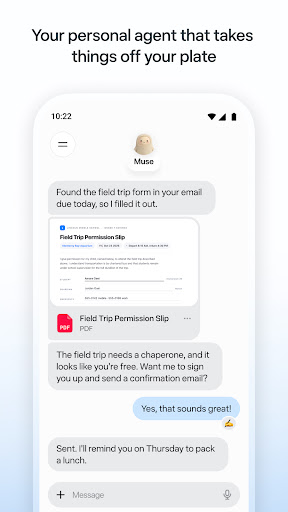
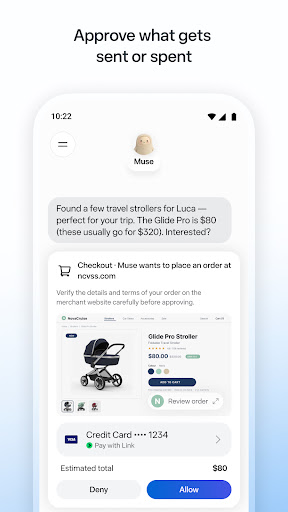
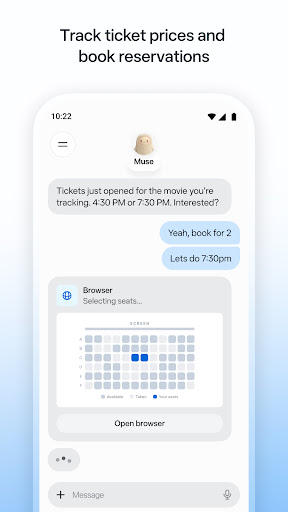
Muse from Meta is a productivity mobile app that turns scattered thoughts into organized notes through a simple, low-friction interface. Built for quick capture, it helps you jot ideas, save references, and shape them into structured, shareable documents without switching between multiple tools.
Overview
Core Features
- Meta AI assistant for questions, brainstorming, and everyday task support
- Conversational chat interface with natural language understanding
- Image generation and visual creation from text prompts
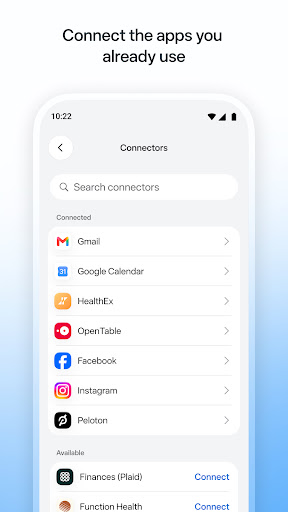
- Cross-app integration within Meta platforms like WhatsApp and Instagram
- Real-time responses with contextual follow-up conversations
- Voice input support for hands-free interaction
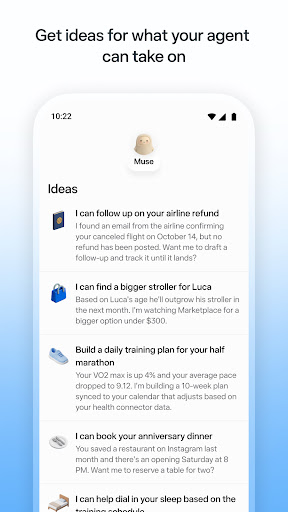
- Personalized suggestions based on your interests and history
Who This App Is For
This mobile app suits users aged 18 to 45 who want quick answers, creative help, or casual chat on the go.
Students, creators, and busy professionals use it as an app-based solution for brainstorming, drafting, and daily planning.
Why Choose This App
This Android app brings Meta's AI into one simple chat space, saving time on research, writing, and idea generation.
Unlike standalone tools, its app features connect with platforms you already use, offering a smoother, more familiar app experience.
Pros & Cons
Pros
-
Muse from Meta connects effortlessly with Instagram, Facebook, and WhatsApp, letting you generate and share content without switching apps, which saves time and keeps your workflow smooth.
-
The app uses a clean, minimal design with clear prompts, so even first-time AI tool users can create text, images, or captions in just a few taps.
-
Simple requests like drafting a social media post or summarizing a short article return results in under two seconds on a stable connection, making it feel responsive.
-
Muse can reference your public posts or liked pages (with permission) to tailor ideas, such as suggesting a birthday caption that matches your usual tone.
-
You get unlimited basic text generation and a daily quota of image generations at no cost, which is enough for personal projects or light social media management.
Cons
-
There are no fine-tuning options for tone, length, or style beyond a few presets, so professional writers may find outputs too generic; impact level: medium. Workaround: use external prompt templates or wait for an expected update adding sliders for creativity and verbosity.
-
The model sometimes invents details, like wrong dates for historical events or fake product specs, without warning; impact level: medium. Workaround: always verify facts with a quick search, or use the 'Ask for sources' feature in beta.
-
You cannot specify camera angles, lighting, or exact object placement, so results may need several rerolls; impact level: low. Official improvement: Meta has announced a future 'advanced canvas' mode for selective editing.
-
Using Muse requires granting access to your profile data, which may feel intrusive if you prefer keeping AI interactions separate; impact level: high for privacy-focused users. Temporary solution: create a secondary Meta account solely for Muse use.
-
The app needs an active internet connection for every request, so it is useless on flights or in areas with poor signal; impact level: low. Expected fix: Meta is testing a lightweight on-device model for basic prompts, likely in the next major update.
Advertisement
Download Muse from Meta
FAQ
What is Muse from Meta and what does it actually do?
+
Muse from Meta is a creative AI image generation tool that lets you turn short text prompts into original visuals right on your phone. Instead of juggling separate editing suites, you get an app based solution that blends prompt writing, style controls, and quick sharing in one place. It is built for people who want to sketch out ideas, mock up mood boards, or just play around with AI art without a steep learning curve.
Is Muse from Meta available as both an Android app and an iOS app?
+
Yes. You can pick it up as an Android app through Google Play or as an iOS mobile app on the App Store. The core app features are largely the same on both platforms, so you are not really missing out whichever phone you carry. If you switch between an iPhone and an Android device, your account and creations should follow you once you sign in.
Do I need a Facebook or Instagram account to use Muse?
+
Because Muse comes from Meta, the smoothest path is signing in with an existing Facebook or Instagram login. That said, the app generally walks you through account creation inside the app experience itself, so you do not need to already be a heavy social media user. Using one login just makes it easier to keep your generations synced across devices and avoids losing work if you reinstall the app.
What are the main app features I should know about?
+
The headline feature is text-to-image generation. You type a prompt, pick a style, and Muse produces a set of variations you can refine. From there you can re-roll results, tweak the wording, and save the ones you like. There are also style presets that act like quick filters, plus export and sharing options. A lot of the appeal is how little friction there is between having an idea and seeing a rough version of it on screen.
Is Muse from Meta a launcher app or a productivity tool?
+
It is not a launcher app, so it will not replace your home screen or change how you open other apps. It sits in the productivity and creativity space instead. Think of it as a pocket studio for brainstorming and visual drafting. Designers, marketers, students, and hobbyists use it to get past a blank page fast, then polish things elsewhere if they need a finished asset.
What kind of prompts work best in Muse?
+
Short, specific prompts tend to beat long rambling ones. Instead of "a cool picture," try something like "a cozy reading nook, warm lamp light, watercolor style." Mentioning subject, mood, lighting, and style gives the model more to work with. If the first batch of results misses the mark, change one variable at a time. That way you learn what actually moves the needle in your app experience.
Is Muse from Meta free, and are there in-app purchases?
+
You can start using Muse without paying, but free usage usually comes with limits on how many images you can generate in a given window. Heavier users may run into a paid tier that raises those caps or unlocks extras. Prices and limits can change, so it is worth checking the current listing on Google Play or the App Store before you commit to anything. No surprise charges here, just the usual freemium setup.
Who owns the images I create in Muse?
+
Ownership and usage rights depend on Meta's terms of service and any applicable AI content rules in your region. The safe move is to read the current terms inside the app or on Meta's site before you use generated images commercially. For casual sharing and personal projects you are generally fine, but if money is involved, do your homework first. It is a small step that saves headaches later.
Does Muse from Meta work offline?
+
No. Generation happens on Meta's servers, not on your phone, so you need an active internet connection, either Wi-Fi or mobile data. That is typical for AI tools of this kind. If you are on a spotty connection, expect slow results or failed attempts. Cached images you have already saved to your gallery should still be viewable offline, though.
How does Muse compare to other AI image apps?
+
Muse leans on Meta's own models and its social ecosystem, which makes sharing and cross-device syncing pretty painless. Other tools may offer more granular controls like inpainting, custom model training, or higher resolution exports. The trade-off is usually complexity. If you want fast, decent-looking results without a manual, Muse is a solid pick. If you need pro-level editing, you may end up pairing it with a dedicated editor.
What phone do I need to run Muse smoothly?
+
Since the heavy lifting happens in the cloud, you do not need a flagship device. A reasonably modern iPhone or Android phone with a current OS version and a stable connection will do the job. Storage matters more than raw power, because saved images pile up quickly. Clearing old generations now and then keeps the mobile app feeling snappy.
Can I use images from Muse for my business or social media?
+
Many people do, but the honest answer is: check the terms first. Meta's rules around AI-generated content continue to evolve, and different platforms have their own disclosure requirements. Some marketplaces ask you to label AI art. Reading the fine print takes five minutes and keeps you on the right side of things. When in doubt, treat generated images as drafts and add your own human touch before publishing.
Is my data private when I use Muse from Meta?
+
Your prompts and generations are processed by Meta, so they fall under Meta's data policy rather than staying purely on your device. That is standard for cloud-based AI tools. If privacy is a priority, avoid typing sensitive personal information into prompts. You can review exactly what is collected and how it is used in the app's privacy section before you dive in.
What should I do if Muse is slow or keeps crashing?
+
Start with the basics: force close the mobile app, check your connection, and make sure you are on the latest version from Google Play or the App Store. Clearing the cache can help on Android, and freeing up storage helps on both platforms. If the trouble continues, report it through the in-app feedback option. Persistent bugs usually get patched quickly because the app is still relatively new.
Does Muse from Meta replace tools like Photoshop or Canva?
+
Not really. Muse is great at the ideation stage, generating concepts, backgrounds, and rough visuals fast. It is not built for pixel-level retouching, typography, or layout work. Most people use it as a starting point, then move finished pieces into a full editor. Treating it as one part of your creative workflow, rather than the whole thing, is the realistic way to get value from it.
How often does Muse get new app features?
+
Meta tends to ship updates in waves. You will often see new style presets, better prompt handling, and occasional UI tweaks. Major upgrades usually get mentioned in the app's changelog, so keeping auto-updates on is the easiest way to stay current. If you like testing new stuff early, some regions get features before others, so your mileage may vary depending on where you live.
Is Muse from Meta worth trying for casual users?
+
If you enjoy playing with AI art, brainstorming visuals, or just want a fun creative outlet on your phone, yes, it is worth a look. The learning curve is gentle and the results come fast. Just go in knowing the limits: it is a creative assistant, not a full design suite. For a free-to-start app based solution, that is a pretty fair deal.
Write a Review
Share your experience with Muse from Meta. Submissions are reviewed before publishing.
You Might Also Like
More apps you may want to try next.




