

Microsoft Defender: Antivirus
Advertisement
Screenshots
Advertisement
About Microsoft Defender: Antivirus
Overview
core features
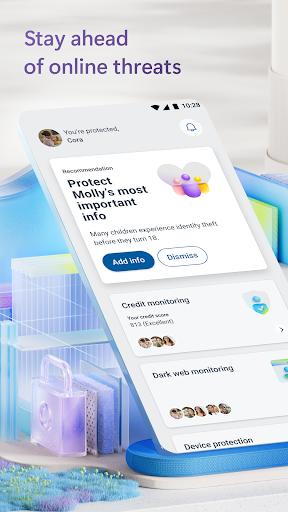
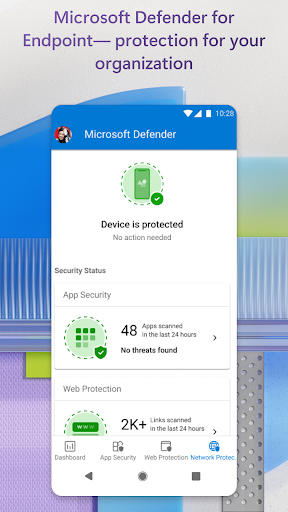
- This app has real-time threat detection that can immediately detect and block malware or spyware on your device. It responds so quickly!
- Its startup interface is super intuitive and easy to get started. All security tools can be completed with a simple operation, making it quite convenient to live in.
- The automatic update feature ensures that your device is always resistant to the latest security vulnerabilities, just like putting a solid layer of armor on your device.
- Advanced scanning options allow you to deeply scan your Android apps and files, greatly improving the security of your device and making you feel more at ease.
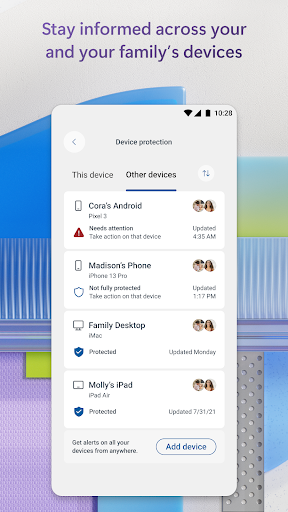
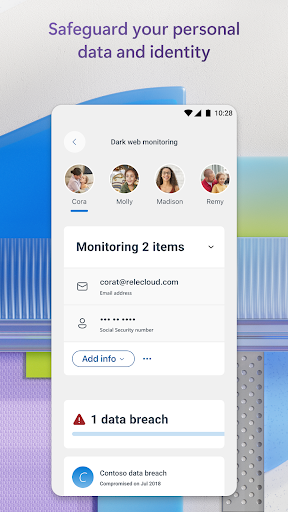
- It also provides a privacy control panel to monitor application permissions and help you guard sensitive data, giving you a lot of peace of mind.
- The performance optimization tool can also free up storage space and improve speed. The effect is good without affecting security protection. What a thoughtful design!
Who is this app suitable for?
This mobile phone software is especially suitable for friends who use Android devices. Those who value security and privacy. Whether you are a technologist or a novice, you can use it comfortably and ensure that everyone can enjoy a reliable security experience.
Whether you are busy at work, need to protect work data, or idle users want a little peace of mind, this application-based solution can meet your needs, not only protecting personal privacy, but also allowing you to play and live more safely online.
Why choose this app?
This software combines powerful security features with an easy-to-use interface, making it the best in Android. All-round protection and smooth experience allow you not to worry about security issues and have more peace of mind.
Continuously updated functions and trustworthy protection mechanisms provide an efficient and practical mobile phone security solution, specially built for the needs of modern people, allowing every user to use it without worry and peace of mind.
Top Recommended Alternative

Pros & Cons
Pros
-
Real-time detection of viruses and trojans
-
Deep system integration
-
automatically updated
-
Operator interface affinity
-
Low resource footprint
Cons
-
Less personalized settings
-
False positives occasionally occur
-
Slightly insufficient threat detection in memory
-
Specialized ransomware protection is not enough
-
Detection of some new viruses is unreliable
Advertisement
Download Microsoft Defender: Antivirus
FAQ
Microsoft Defender: Antivirus is safe on my mobile phone? +
Of course, Microsoft Defender: Antivirus is a reliable security software produced by Microsoft. Everyone knows its security performance. Its goal is to help you protect your mobile phone security without forgetting to protect your privacy.
As a security app on Android, it strictly adheres to security standards, updates frequently, and scans in real time to ensure that your device is stable. With it, you can feel safe and your data can be protected reliably.
How to install Microsoft Defender: Antivirus on an Android phone? +
It's actually quite simple to install this app. You just need to go to Google Play or the Apple Store and search for "Microsoft Defender: Antivirus". The interface is refreshing and the operation is not complicated. It can be understood at a glance, and just follow the prompts step by step.
Once installed, it will require some permissions, and it will work normally after being granted. It can protect in real time, check for viruses, etc., and has full functions, so that you don't have to worry about your safety on your mobile phone, saving your heart and effort.
What are the main features of Microsoft Defender: Antivirus? +
This software mainly has the function of detecting and killing viruses, Trojans, and various threats in real time, and can also detect potential safety hazards for equipment. It is also equipped with privacy protection tools, features to optimize performance, and is automatically updated to ensure security is always online.
As an Android-friendly launcher, the operating interface is very intuitive and managing mobile phone security becomes particularly simple. These features make it a good helper to protect your data and keep your phone in good condition.
Will using Microsoft Defender: Antivirus affect my application experience? +
Not at all, really! This software is designed to integrate into your phone without making your APP stuck or sluggish. It works quietly in the background to protect your equipment without affecting your daily operations.
Many people think that its functions can actually enhance the overall sense of use, such as anti-virus and ensuring the safe operation of Android applications. This lightweight design is also very practical, and if you want to be safe without slowing down the system, it's definitely a good choice.
Can I use Microsoft Defender: Antivirus as a launcher? +
Although it is mainly security software, you can use it as a security portal and quickly access various security functions. However, it doesn't manage desktop applications as comprehensively as a dedicated launcher.
Still, it can help you improve your overall experience-providing proactive security measures and managing how Android devices respond to threats. As a treasure in the safety toolbox, it is still very valuable.
Customer Reviews
Users generally appreciate Microsoft Defender: Antivirus for its smooth user interface, ease of navigation, and reliable security protection, with many praising its intuitive design and effective threat safeguarding. Key strengths include comprehensive, professional protection and consistent performance. However, critical issues emerge: sign-in problems and missing verification codes frustrate some users, while others report the app failing to function or features unexpectedly disabling, requiring manual re-enabling. Opinions on effectiveness are mixed—some find it a top choice for productivity and safety, yet others label it the worst app due to poor functionality and hidden payment requirements. The app’s stability is praised by some as reliable, but criticized by others as inconsistent and not worth the cost.
Write a Review
Share your experience with Microsoft Defender: Antivirus. Submissions are reviewed before publishing.
You Might Also Like
More apps you may want to try next.




