

Meta Business Suite
Advertisement
Screenshots




Advertisement
About Meta Business Suite
Overview
core highlight
- This app has a super friendly dashboard that allows you to do all business tools at a glance. How thoughtful!
- Real-time synchronization ensures that your business data is instantly updated to every device, worry-free and fast!
- Comprehensive analysis function helps you see through page performance and fan interaction at a glance, and you have a clue!
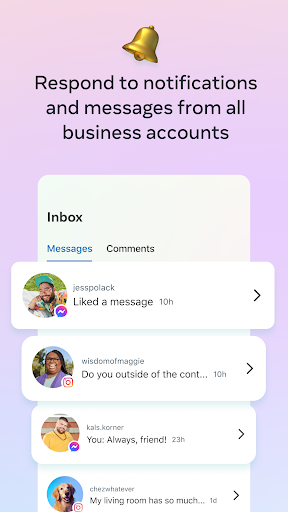
- Built-in messaging tool allows you to communicate directly with customers, making inquiries particularly simple and convenient!
- The scheduling feature helps you plan and automatically publish social media content, saving yourself time and effort!
- Offline mode allows you to manage some basic tasks even without the Internet. Don't say I didn't tell you, it's really thoughtful!
- The seamless connection with the Facebook page is simply the best initiator for making all business management matters easy!
- Push notifications will inform you of important developments and customer interactions as soon as possible, and you will not miss any good opportunities!
Who is this app suitable for?
This mobile app is especially suitable for small business owners, social media managers, and entrepreneurs aged 20 to 50 who are looking for a reliable tool to manage their online image. I sincerely recommend it!
Whether you're managing multiple Facebook pages or running a local business, you can use it to help you stay organized and responsive when you're busy, all in control on your Android device!
Why choose this app
This Android app provides rich functions, making cumbersome business management simple and intuitive, so you can easily start anyone who is busy!
Its highlight is real-time updates and perfect integration capabilities, allowing you to keep in touch with fans at any time and respond quickly to changes. It is a reliable assistant for active business users!
Top Recommended Alternative

Pros & Cons
Pros
-
centralized management
-
user-friendly interface
-
Powerful analytical tools
-
free use
-
Scheduling and publishing capabilities
Cons
-
Limited cross-platform automation
-
Occasional synchronization delay
-
Insufficient depth of analytical functions
-
App stability issues
-
Limited support for third-party tools
Advertisement
Download Meta Business Suite
FAQ
Is it safe to use Meta Business Suite on your mobile phone? +
Don't worry, Meta Business Suite is designed in accordance with security to protect your data. If you download it from the official app store, you can basically trust its security and reliability. After all, it is a business-oriented mobile application.
Remember to keep your device system up to date and try to download apps from trusted channels so that you can maintain a safe and smooth experience when managing your account on your Android or iOS phone.What happens when I log in to Meta Business Suite for the first time? +
To get started with this app-based thing, it's actually easy. Just open Meta Business Suite and log in with your existing Facebook or Instagram account. It supports secure login and helps you protect your business data well.
Ifyou don't have an account yet, you can register one directly when you log in. After you're done, you can quickly access your business page and start managing your application functions immediately. It's very convenient!
Are the versions of Android and iOS different? +
Of course, the Meta Business Suite can be downloaded to the Android version on Google Play, and there is also a special version on Apple's App Store. The versions of both platforms are easily adjusted to ensure that the experience is similar, so that you can operate smoothly without having to keep changing platforms.
Moreover, there are regular updates, new features are constantly added, and the experience is improved. Whether you are using Android or iOS, you can remain efficient and practical.
What are the functions of Meta Business Suite? +
This app helps you manage your Facebook and Instagram accounts, such as posting, monitoring data, chatting with fans. It functions like a little assistant that allows you to easily handle all business management on your mobile phone.
Thedesign is particularly friendly and simple to operate, so it can be done without a computer. It's like an all-around starting point to help you with social media anytime, anywhere.
Can I use Meta Business Suite without a network? +
Most functions have to be online, especially content updates and data viewing. You can't use much offline. However, some functions such as scheduled posting may be able to operate offline a little bit after setting up.
Inorder to use it smoothly, it is recommended to maintain a network connection, which will make it much easier to manage your business accounts!
Is Meta Business Suite suitable for small businesses? +
Of course, it is especially suitable for small shops or start-up businesses. It provides some very practical functions that you can understand at a glance and can help you easily cope with the trouble of social media management. The user interface is friendly and simple to operate. If you want to promote it, you don't have to mess with complex software.
Whenyou start a business, you can also use this lightweight tool, which is flexible and powerful. It will help you gradually build up your online image without feeling too stressful.
How to upgrade Meta Business Suite to use the latest features? +
To ensure that you use the latest features, you must regularly update Meta Business Suite in the app store. Each update adds new features, improves security, and optimizes the operating experience to make your management easier.
MaintainingAndroid and iOS versions is an important step in maintaining the reliability of your tools so that you can manage your business safely and efficiently on your phone.
Can I use Meta Business Suite for old equipment? +
This depends on the operating system version of your device. Currently, most of these apps are optimized for new versions of Android and iOS. Old devices may be stuck or may not run smoothly. It is recommended that you ensure that your device's system meets the official minimum requirements, so that you can maximize its performance and manage your business more smoothly.
Overall, if the equipment is new enough and the system can keep up, using Meta Business Suite will be much smoother and save you a lot of peace!
Customer Reviews
Meta Business Suite is generally praised for its user-friendly interface, smooth performance, and helpful functionality. Many users report a positive experience, noting it as a top choice for daily tasks and business management. However, some users express frustration with frequent crashes, poor design, and missing basic features. While the app is considered excellent overall, reliability issues and excessive system fan noise have been noted by a few. The majority find it wonderful and highly recommended.
Write a Review
Share your experience with Meta Business Suite. Submissions are reviewed before publishing.
You Might Also Like
More apps you may want to try next.




