FamiliarApps logo
HD Camera

HD Camera

Advertisement

Screenshots
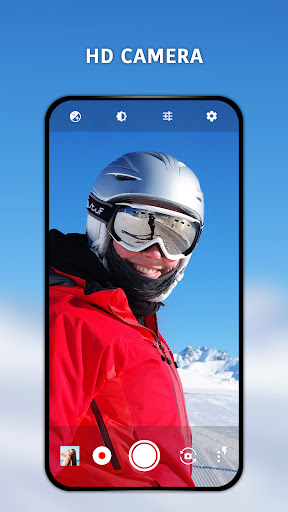
8 images
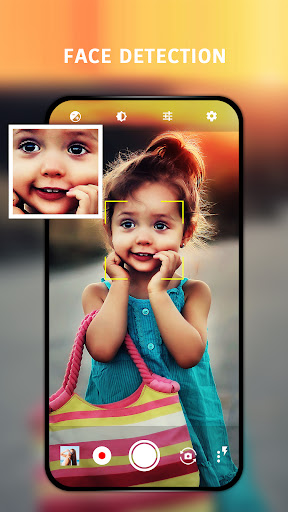
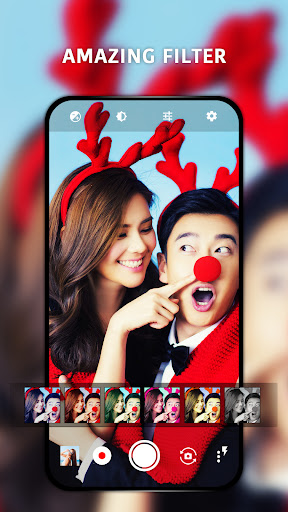
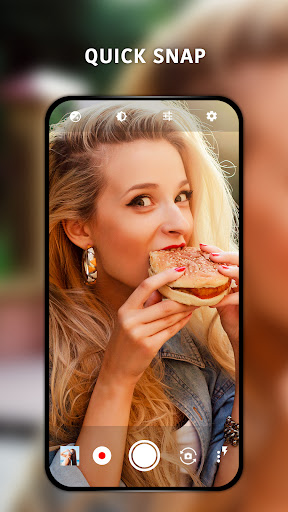
HD Camera screenshot 1 HD Camera screenshot 2 HD Camera screenshot 3 HD Camera screenshot 4 HD Camera screenshot 5 HD Camera screenshot 6 HD Camera screenshot 7 HD Camera screenshot 8

Advertisement

About HD Camera

HD Camera is a good app. It is a very practical mobile phone app specifically designed to make it more convenient for you to take photos on your Android phone. The interface design is quite intuitive, the operation is not complicated, and the functions are quite powerful, so you basically don't have to worry about not being able to shoot well. Whether you are a new photographer or a photographer with some experience, this Android app is friendly and easy to use, so taking photos becomes easy and fun, which is a really good choice!

Overview

Core Features

  • The interface design of this APP is particularly intuitive, allowing everyone to easily take high-quality photos. It's really considerate!
  • Those advanced editing tools are really considerate. You can adjust brightness, contrast, and even filters directly inside, which is super convenient!
  • The real-time viewfinder is combined with autofocus and exposure control, and the experience is bursting. Whether it is a professional photographer or a casual photographer, it can be used smoothly.
  • Support offline mode, no matter whether the network is connected or not, you can pick up your mobile phone to take photos and edit at any time. It's so considerate!
  • Powerful photo album classification helps you manage easily, and those photos can be shared to social media or cloud disk at any time, which is super convenient!
  • Built-in timer and continuous shooting function allow you to easily capture the perfect moment without worrying about missing anything!
  • There is also a shortcut entry function, which allows you to start shooting immediately after turning it on. The settings are pitifully few and super fast!
  • These functions are really well thought out and are especially suitable for users of different levels. They can be used easily from novices to photographers.

Who This App Is For

This mobile app is especially suitable for photography enthusiasts, casual users and social media fans. If you want to take better photos on your Android device, it is definitely suitable!

For those who want to use a reliable APP to quickly edit, produce professional results, or just want to easily record daily life, it is simply a lifesaver!

Why Choose This App

Not only is this Android app comprehensive, it also operates smoothly, making taking photos easier and more fun than ever!

Focusing on ease of use, stability and innovative tool design, it has become a trustworthy launcher that allows you to take high-quality photos without worrying about cumbersome processes!

Top Recommended Alternative
Pros & Cons

Pros

  • High-resolution shooting
  • Advanced manual adjustment
  • Live filters and editing tools
  • interface is easy to use
  • Support external accessories

Cons

  • High hardware requirements
  • Occasionally break down
  • Pay for many advanced features
  • The learning curve for beginners is steep
  • Slow export of large files

Advertisement

Download HD Camera

You are going to be redirected to the official website to finish the download when you click these buttons above.

FAQ

Is HD Camera a safe application and can it be used on my mobile phone? +
Of course, HD Camera is actually quite reliable. It is a relatively trusted application. It always pays attention to user safety issues when developing. It comes from a channel with good reputation and is updated frequently to ensure safety. Remember to download it from the official app store, and don't go to a third party for cheaper costs. That will be risky. The design of this application ensures that your privacy will not be easily violated, that you do not need those random requests, and that your data will not be easily leaked. You can take photos and edit with it, and the security is good. Playing it on your Android device is quite easy to use.
How can I install the HD Camera on my Android phone? +
It's actually quite easy to install an HD Camera. Just open the Google Play Store, search for the HD Camera, and then follow the process. This app is compatible with various Android versions and can be basically done in a few steps, making it very convenient. After installation, all its functions can be used, from taking high-quality photos to editing with various tools, the operation is quite intuitive and can be easily handled by anyone. Whether you are a novice or an old bird, you can use this thing easily. It's a very thoughtful application.
What are the main functions of HD Camera? +
This HD Camera is quite functional and is specially designed for people who like to take pictures. It can take high-resolution photos with real-time filters, and the operating interface is easy to use. In this way, many users who like to take photos find it quite reliable. In addition to taking photos, it can also record videos, edit photos, and support sharing, making it easy to use. Whether it's casual filming or professional shooting, its design makes people feel comfortable to use, and the whole experience is quite smooth.
Can I use HD Camera as my phone launcher app? +
In fact, HD Camera is mainly an application for taking photos and recording videos. It has no direct relationship with your mobile phone interface and cannot be regarded as something like a launcher in the traditional sense. However, it is quite compatible and works well with your mobile phone interface. It is a good helper specifically for taking photos. It can make it convenient for you to directly use this APP to quickly take photos or edit, saving a lot of switching time. Let's just say it's not the kind of starter that replaces your mobile phone's home page, but it's quite convenient to use as a "tool kit" for taking photos.
Is HD Camera suitable for professional photography? +
Although HD Camera is quite good for casual and semi-professional photography, and its functions are quite powerful, it may not be possible to completely replace those high-end professional-grade post-stage software. It is more like an entry tool for enthusiasts and is quite friendly to use. If you want to improve your photo skills with your mobile phone, this app is definitely a good brick. It can help you take clear and sharp photos. It is also simple to operate and suitable for most people.
Can HD Camera be used offline, or does it have to be connected to the Internet? +
Most of the functions can be used offline, and you don't need to be connected to the Internet. You can use it anytime and anywhere, which is quite convenient, especially when traveling or taking photos in places without WIFI. This is very thoughtful. However, some sharing or cloud backup functions may have to be connected to the Internet to be used, but the core photography and editing can be done offline, giving you a lot of freedom.
Are there any security precautions or permissions I need to know? +
This HD Camera will request some permissions, such as camera permissions and storage permissions. After all, this is a normal requirement. It is recommended that you read the permission request before using it to confirm that your privacy will not be exposed. Reliable apps like this will abide by strict privacy protection rules. Don't worry, it is professionally designed for safety reasons. You can use it to take photos and edit pictures with peace of mind without any risk.
Compared with other Android photo apps, is HD Camera special? +
Compared with other Android camera software, HD Camera stands out in that its operating interface is particularly friendly and its functions are relatively comprehensive. It has high-quality photo effects and a variety of editing tools, suitable for casual users and friends who like photography. It's easy to use, and the whole experience is quite smooth. Moreover, it combines well with your device. It's a very reliable and easy-to-use choice. If you want to find an easy-to-use camera software, I still recommend it.

Customer Reviews

AI
AI Generated Summary
Based on real user feedback
★ 4

Users generally praise HD Camera for its smooth performance, excellent image quality, and user-friendly interface. Key strengths include sharp and vibrant photos, effective handling of various lighting conditions, and seamless auto-save to microSD card. However, there are notable issues: while some users highlight improved clarity and color accuracy over the original camera, others report inferior performance with lower clarity and more noise. The zoom function in dark environments causes glitches and flickering for some, yet many find the app reliable for everyday use. Additionally, flash mode photos appear too dark and intrusive full-screen ads after every picture frustrate users, making the app nearly unusable for some. Despite these drawbacks, the overall sentiment remains positive, with many recommending the app for its features and ease of use.

Prasad Kumar Yadav · 2026-06-22
★ 5
I love photography because it allows me to capture beautiful moments and express creativity. The joy of framing a perfect shot is unmatched. 📸
pc2053 · 2026-06-22
★ 5
Well-assembled quality. An excellent program.
Tenkhul Chithan · 2026-06-22
★ 5
This alternative provides noticeably improved image clarity and color accuracy, outperforming the original camera in low-light conditions and overall detail reproduction.
op gaming · 2026-06-17
★ 5
This is a positive evaluation.
Wilhelm Saar · 2026-06-13
★ 5
... the best one for me!

Write a Review

Share your experience with HD Camera. Submissions are reviewed before publishing.

Rating *
0 / 2000

You Might Also Like

More apps you may want to try next.

Advertisement
5
Please wait...