FamiliarApps logo
Garmin Golf

Garmin Golf

Advertisement

Screenshots
7 images
Garmin Golf screenshot 1 Garmin Golf screenshot 2 Garmin Golf screenshot 3 Garmin Golf screenshot 4 Garmin Golf screenshot 5 Garmin Golf screenshot 6 Garmin Golf screenshot 7

Advertisement

About Garmin Golf

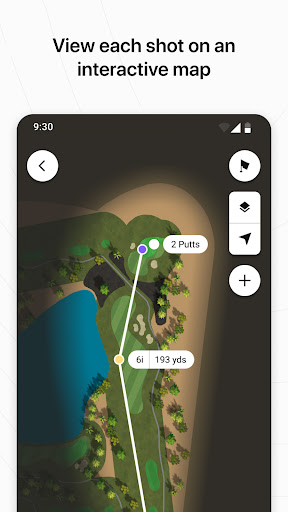
Garmin Golf is actually a mobile app tailored for friends who love to play golf, and wants to make your golf experience better. This Android app has quite comprehensive functions, including detailed stadium maps, batting trajectory tracking, and scoring. Through the mobile phone platform, it provides you with real-time data information and some suggestions for improving your level. Whether you are an occasional player or a serious golfer, you can benefit from it. It is really a useful tool.

Overview

core functions

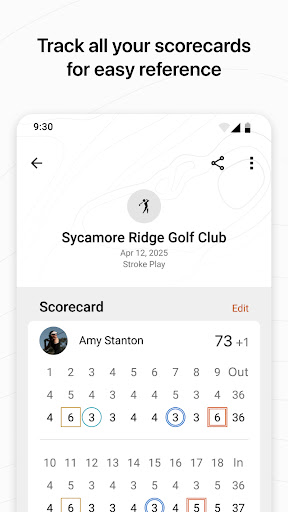
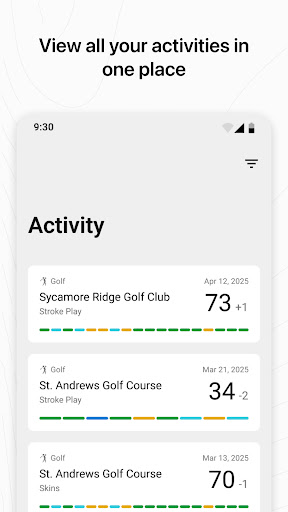
  • You can track your golf score in real time and update it while playing, which is super convenient!
  • A rangefinder with GPS and a course map help you aim accurately, develop smarter tactics, and play more steadily.
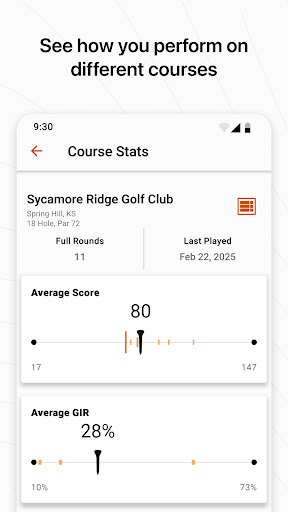
  • Personalized statistical analysis will gradually help you identify strengths and areas that need improvement to improve and improve your level.
  • Seamless connection with Garmin equipment provides golf fans with a smoother experience and feels like a personal assistant.
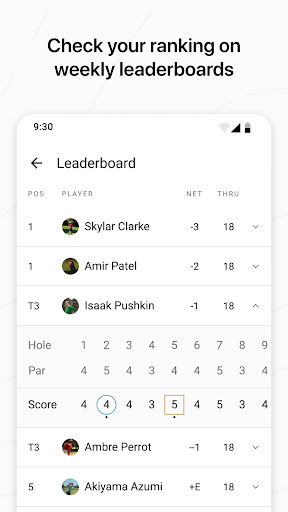
  • Real-time leaderboards and social features, competing with friends and sharing your progress is more than a little fun.
  • Offline mode is also quite considerate. When there is no Internet, you can still view the stadium map and tracking records, and you will never be alone.
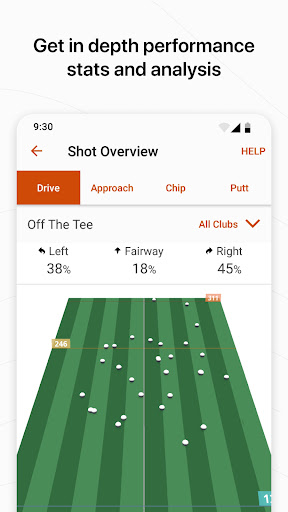
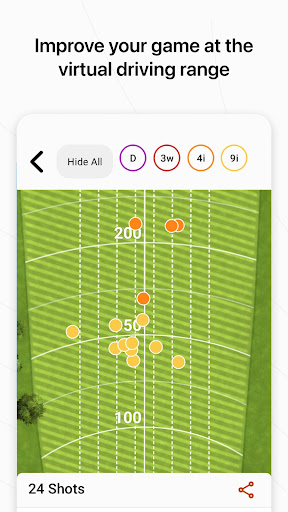
  • Detailed shot records and club tracking help you make more scientific adjustments and improve your performance.

Who is suitable for?

This mobile app is especially suitable for golf enthusiasts of all ages who want to use a reliable and simple Android software to improve their skills. Whether you are a casual novice or a seasoned expert, this app can meet your various needs and truly consider it for the players.

For friends who like to track their playing status, analyze their scores, and keep in touch with friends, this tool is definitely a good helper for you. Regardless of your level, using it is a reliable choice to improve and enjoy the game.

Why choose this app

What makes this Android app special is that it combines accurate GPS with meticulous statistical analysis to give you a complete golf partner experience. The interface is intuitive, easy to use, and powerful, making it the first choice in the hearts of many players.

What's even better is that it focuses on providing real-time data and a smooth operating experience to make you more comfortable when playing. This reliable app helps you play smarter and make progress faster. It is definitely a good helper for you to improve your skills!

Top Recommended Alternative

Pros & Cons

Pros

  • The user interface is very friendly
  • GPS tracking is very accurate
  • The coverage is extremely rich
  • Post-game data analysis
  • Works perfectly with Garmin equipment

Cons

  • Limited offline functionality
  • The battery will run out after using it for a long time
  • Course information is not updated in a timely manner
  • Limited personalization
  • Occasionally collapse or instability

Advertisement

Download Garmin Golf

You are going to be redirected to the official website to finish the download when you click these buttons above.

FAQ

Is Garmin Golf compatible with all devices? +
Garmin Golf is mainly designed for Android devices and provides golf enthusiasts with a smooth and reliable application experience. It supports most Android smartphones and tablets, but it's a good idea to verify that your device's specifications meet the requirements before installing. Although there is no official Apple version of Garmin yet, Android users can enjoy all the features that can help you improve your game skills. This app provides the necessary golf tracking and course information, making it a good companion for outdoor sports.
How do I install Garmin Golf on my Android device? +
Installing Garmin Golf on an Android device is actually quite simple. Just open the Google Play Store, search for 'Garmin Golf', and then click the install button. Once you download it, you can create an account and start using various functions. This mobile app is user-friendly, making it easy to track your game data and check course information whether you are a novice or a veteran golfer. Remember to make sure your device meets the requirements of your application so that it can be used smoothly.
Are there any safety concerns when using Garmin Golf? +
Garmin Golf is a safe and trustworthy app developed by well-known GPS and sports equipment companies and is easy to use. It will securely process your location information and will not disclose personal information without your consent. Pay attention to keeping your mobile phone system updated and downloading apps from official channels. This will ensure the safety of your golf activities and equipment without any mistakes.
Can I use Garmin Golf without an internet connection? +
Yes, Garmin Golf has some offline features, such as downloading a course map in advance or tracking your shots during a game. But if you want to update scores in real time or get the latest data, you have to connect to the Internet. In order to make the experience smooth, it is recommended to download the information of your favorite stadium in advance, so that even if you don't have the Internet, you can have a lot of fun and have fun.
Is Garmin Golf suitable for beginner golfers? +
Of course, Garmin Golf is designed to be particularly suitable for beginners. Its various functions can help rookies learn and improve. The interface is friendly and the statistics are detailed, allowing you to better understand what aspects you are doing well and what you need to work hard. It is particularly intuitive to use. Tracking your shots, checking course information, and reading performance analysis can help you gradually improve your skills.
Does Garmin Golf work as a launcher app or require additional devices? +
Garmin Golf is mainly a mobile application, not a launcher-type program. For maximum results, you can use it with Garmin's GPS device or smart watch to better track and sync data. This application can be seamlessly connected with Garmin's hardware to bring a more complete golf experience with no less real-time data and analysis. It is a flexible tool specifically designed to enhance your existing golf equipment.
How does Garmin Golf enhance the app experience for users? +
This app provides many features that can help you better plan and track performance. From detailed course maps to shot tracking and scoring, Garmin Golf brings an immersive outdoor experience. Using real-time statistics and post-game analysis, you can gain a lot of valuable insights to help you improve. Many golf enthusiasts trust this app and think it is both reliable and detailed, and is a good choice.

Customer Reviews

AI
AI Generated Summary
Based on real user feedback
★ 3.5

Users widely praise Garmin Golf for seamless integration with Garmin watches and radar devices, accurate distance tracking, shot analysis, and intuitive course management. Many find it excellent for reviewing rounds, tracking club usage, and improving gameplay. However, recent updates have introduced critical issues: a persistent 'Continue/Save/Discard' bug prevents rounds from saving, causing data loss; the app frequently crashes and fails to sync scorecards from devices like the Approach G12 and S62. Some users report that shot tracking and fairway displays are now incorrect or missing, and basic stats (e.g., birdies, putts) are absent. While longer-term users appreciate functionality for storing scorecards and shot history, others find the app nearly unusable after updates, with unresponsive technical support. Tablet compatibility and lack of a course name search are also noted drawbacks. Overall, the app delivers great core features but is marred by recent instability and missing improvements.

Alec Mav · 2026-06-16
★ 5
These Garmin golf products are excellent. I strongly recommend them—they work seamlessly and are incredibly reliable, making every round better.
Bravo Echo · 2026-06-15
★ 2
I have been using this app for a long time and saved scores from courses worldwide. Please add a search function for course names in the golf course statistics and scorecards subsections. It's painful to search manually every time. I would give more stars otherwise.
Claudia Bleeker · 2026-06-13
★ 5
Even though you have to enter a lot manually in Wintergrün, the watch and the app are great.
Maximilian Schreindorfer · 2026-06-12
★ 1
I use the app on my phone and tablet. On the tablet, access is very restricted. Scorecards cannot be opened.
Walter Liebicher · 2026-06-12
★ 5
Works really well. Pay attention to the corresponding updates, otherwise minor issues may arise. Good options for evaluating individual rounds. Much better than TomTom. Intuitive app operation.

Write a Review

Share your experience with Garmin Golf. Submissions are reviewed before publishing.

Rating *
0 / 2000

You Might Also Like

More apps you may want to try next.

Advertisement
5
Please wait...