ecobee
Advertisement
Screenshots
Advertisement
About ecobee
This ecobee APP is quite good. It is a very convenient mobile phone application. It mainly helps us homeowners manage smart thermostats and home air conditioning systems. It can be used on both Android and iOS, so it's easy to use. It can remotely adjust the temperature at any time, and it's also very practical to see energy consumption analysis. As a must-have mobile app, it makes home automation super simple and helps you easily get comfort. It feels quite intimate.
Overview
Core Features
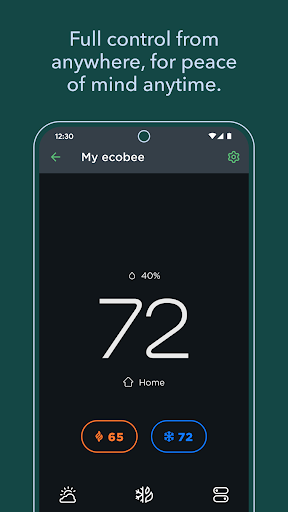
- This app can adjust the thermostat in real time, allowing you to adjust the indoor temperature with your mobile phone at any time. It feels particularly sensitive and responds quickly to me.
- It also comes with an automatic scheduling function to help you intelligently arrange energy conservation, save money and convenience, and you can manage energy yourself without worrying about anything.
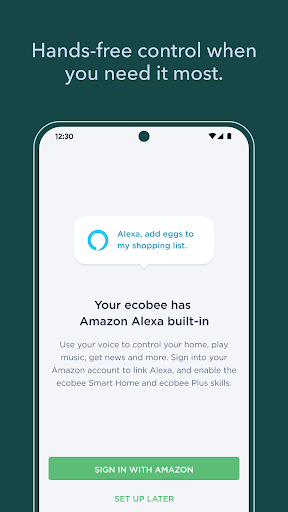
- Moreover, it supports voice control, which can adjust the temperature with sound, frees hands, and is super convenient to operate. It is really a little helper in life.
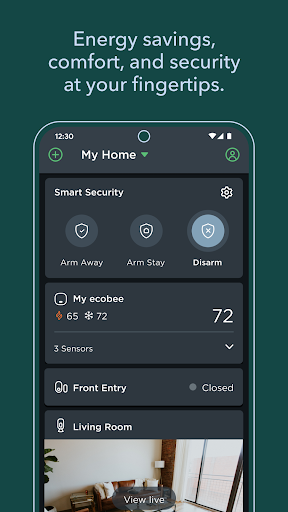
- Remote sensors can provide rich indoor climate data to ensure that every room is comfortable and that the hot and cold are adjusted just right to satisfy the family.
- Push notifications will promptly remind you that there are no problems with the system or areas that need maintenance, ensure the stable operation of the device, and make you feel more at ease.
- The interface design is particularly intuitive, the user experience is smooth, settings and daily operations become simple, and it can be done without thinking.
Who This App Is For
This mobile app is especially suitable for homeowners who want to easily manage their home climate, especially those who care about energy conservation and environmental protection. It is for friends over the age of 25 to help you automate your home without too much trouble.
Whether you are a technologist or a novice, the Android version of this app is easy to use, and it is no problem to remotely control heating and cooling. For those who are busy and want to implement a smart home, it is a lifesaver. They can adjust the temperature no matter where they are.
Why Choose This App
What makes this app special is that it is comprehensive and smooth in operation, helping you easily master climate management at home. The focus is on saving energy and being easy to use. It is a smart choice to find a reliable control solution.
Coupled with high user reviews, reliable performance, and easy to use. Whether it is heating or cooling, it is very practical and efficient. For those pursuing convenience and smart home, this is definitely a good tool to consider.
Top Recommended Alternative

Pros & Cons
Pros
-
The user interface is very friendly
-
Remote control is super convenient
-
Timetable can be customized
-
Ability to monitor energy consumption in detail
-
Smart home docking
Cons
-
Limited device compatibility
-
Occasionally I get stuck
-
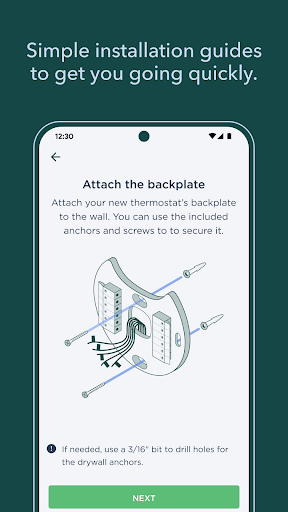
It's a bit troublesome to set up for the first time
-
Notification management needs to be improved
-
The reminder function is not flexible enough
Advertisement
Download ecobee
FAQ
Is the ecobee app safe to use on my mobile device? +
Well, basically, the security measures of ecobee's mobile app are quite strong, ensuring that your personal information and home data are basically protected. Many family owners will use it to fix heating and air conditioning, which is quite credible.
Ofcourse, like all apps, it is recommended to download them from official channels, such as Google Play or Apple App Store. It will also push updates regularly to solve some security risks. It is a reliable thing, so use it with confidence.
How do I log in or create an account on the ecobee mobile app? +
It's actually quite easy to start using this ecobee application. You can register an account directly inside, just enter your email address and set a password. If you already have an account, just log in with your account password.
Afterlogging in, you can unlock all functions, such as remote temperature control, scheduling settings, etc. This software interface is quite convenient. Whether you use Android or iOS, everything works smoothly.
Can I install the ecobee app on different devices or platforms? +
Of course you can! This ecobee app is compatible with Android and iOS. You don't have to worry, as long as it is a smartphone or tablet, you can use it to control your smart thermostat. It can also be well integrated with your home automation system, which is quite convenient.
Nomatter where you are at home, remote access and scheduling can be done, which is quite worry-free. And no matter which platform you use it on, try to give you the same experience without making it unreliable.
What are the main features of the ecobee app? +
This app has quite comprehensive functions, including scheduled scheduling, real-time temperature monitoring, and adjustment of system parameters. It is basically a one-stop solution to help you meet your home's temperature control needs.
Itcan also be used with Alexa or Google Assistant voice control, making it more convenient to use. It can also bring energy consumption reports to help you save money and electricity. It is easy to use overall and improves your quality of life.
How reliable is the ecobee app during internet outages or connectivity issues? +
Although this app mainly relies on network cables and network connections, it can also directly control your thermostat by relying on the local area network Wi-Fi without the Internet. Basically, it can still be used after the network is disconnected, which is quite reliable.
Frequentupdates and strong security measures also reassure people, and stability is still good. Even if there are occasional network problems, you can still ensure that you can control the temperature at home.
Customer Reviews
Users widely praise the Ecobee app for its intuitive interface, remote temperature control, and convenience, with many highlighting the ability to adjust settings from anywhere. The design is visually clean and easy to navigate. However, major frustrations center on recent updates that broke the temperature chart and caused slow startup, sync failures, and unexpected AC shutdowns. While some find the app dependable, others report persistent issues like geofencing failing even with occupancy detection, temperature adjustments not applying without force restart, and the system disconnecting from devices, making remote control impossible. Controversies include required acceptance of new privacy policies (users distrust data sharing) and Android version inconsistency with portrait/landscape display. Missing features like 180° video flip and inability to fully disable schedule (leading to high bills) also draw criticism. Overall, the app has strong potential but suffers from reliability and trust concerns.
Write a Review
Share your experience with ecobee. Submissions are reviewed before publishing.
You Might Also Like
More apps you may want to try next.