

Clean Utility Toolkit
Advertisement
Screenshots
Advertisement
About Clean Utility Toolkit
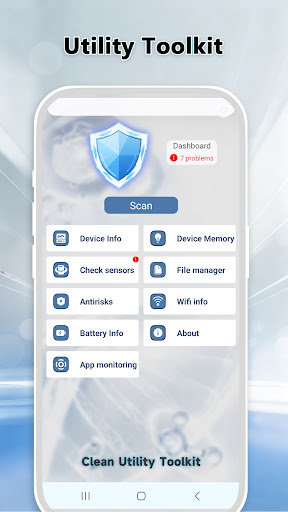
The Clean Utility Toolkit is really a practical Android application. It is designed flexibly to help you solve various performance problems with your device and efficiently manage your files. The interface is quite people-friendly and easy to use. Basic functions such as cleaning garbage, increasing memory, and monitoring the system are all available. The user experience is very smooth and stable. Whether you want to tidy up your phone or improve the overall functionality, the tools in this app are quite reliable and can keep your device in top condition.
Overview
Core Features
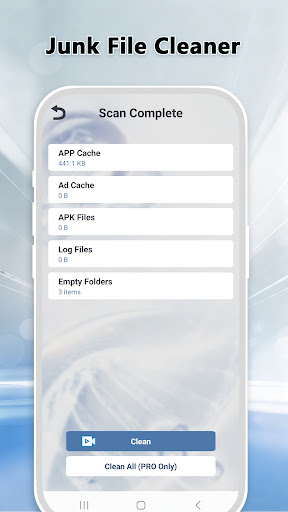
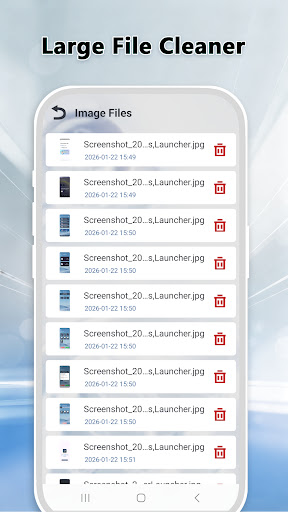
- An intuitive cleaning tool can help you keep the space of your phone in order and make your performance better!
- Monitor the system status in real time and check how the CPU, memory and battery are being used at any time. Keep an idea in mind!
- Set up an automatic scanning schedule and let your phone move on its own, so you don't have to worry about it every day.
- Manage those annoying apps to remove or freeze them, making room and no longer worrying!
- With advanced cache cleanup, apps run smoother and no longer stall!
- A little trick to save energy and help you extend the battery life of your mobile phone. It's like magic!
- File transfer function allows you to quickly share photos and documents, and you can do it in seconds with two devices!
Who is suitable for using this App?
This mobile app is especially suitable for Android users who want to find a reliable launcher that can not only improve device performance but also facilitate maintenance. Whether adults or children, those who love cleanliness and pursue a smooth experience can control it. It is extremely useful!
Whether you are a busy white-collar worker, a hard-working student, or someone who thinks your mobile phone is driving you crazy, this app can help you deal with storage space, speed and battery, so you can use it happily and safely every day.
Why choose this App
It brings a super complete combination of functions, making device management super simple, and the operation is very considerate. Even if you are not a big dog, you can easily get started!
As a trustworthy Android app, it is great for cleaning, speeding up and application management, helping you easily maintain your device properly. Using it is like installing a considerate nanny on your mobile phone. Daily care is not troublesome at all.
Top Recommended Alternative
Pros & Cons
Pros
-
Full-featured utility management
-
Super friendly interface
-
The performance improvement is surprisingly fast
-
Cleaning content can be customized
-
Frequent updates and support
Cons
-
Free features are limited
-
Occasionally misreporting harmless documents
-
It consumes electricity
-
Too much notice will be annoying
-
Poor compatibility with old equipment
Advertisement
Download Clean Utility Toolkit
FAQ
Is this cleanup kit safe to use on my Android device? +
Of course, this cleanup kit is a reliable mobile assistant. In order to make your Android run more smoothly, it has been working hard on security and updates it frequently to ensure safety.
However, remember to download this initiator from official channels, and the security settings must be turned on. Using a reliable software will definitely make the device run more securely without worrying about security issues!
How does this app make the overall experience better? +
It has features to help you clean your system, delete caches, and manage shortcuts. The goal is to make your Android easier to use. The interface design is quite intuitive and is particularly worry-free and convenient to use.
Withthis cleaning toolbox solution, performance can be improved immediately. You can also adjust according to your preferences, and the cooperation with the system is particularly smooth, making the experience better!
Can I customize my Android launcher with this app? +
Of course! This tool is mainly practical. Of course, it also provides certain custom functions, which can help you adjust the launcher interface, making it easier and faster to call important functions. This degree of freedom is quite good and can make your equipment more considerate.
Havinga self-adjustable starter can greatly improve the overall experience and make commonly used functions within reach. Don't forget to explore these features and create your own unique interface!
What are the features of the latest version? +
The new version has basic functions such as cleaning junk files, accelerating memory, and managing applications, which can help you make your device run faster and smoother. It will also tell you about storage space and application usage, making device management easy.
Thesefunctions are not only practical but also very considerate, especially suitable for users who want to use reliable software to improve device performance. The experience is efficient and convenient.
Does this app support all Android versions? +
Basically, this cleanup toolbox works smoothly on most new Android systems, and the experience is quite reliable. It is recommended that it is best to use it on devices above Android 8.0, which will provide the best results.
Beforeinstallation, you can check the compatibility on Google Play. Keeping the system and apps updated to the latest version can avoid a lot of trouble and the functions will function more normally.
How to protect privacy with this app? +
This software still respects privacy quite a bit. It will only request some necessary permissions, such as clearing caches and managing applications. It will not secretly collect your personal data or disclose your information. Don't worry about using it!
Itis recommended that you also review the authority and privacy policy. Understanding this information will give you an idea. Reliable applications like this attach importance to security, transparent information, and are trustworthy!
Does this application require a network connection? +
Many functions, such as clearing cache and system optimization, can be used without networking, which is very convenient. However, some updates or cloud functions may require networking to work properly.
Ifyou want an Android assistant that can be used even if the Internet is disconnected, the cleanup toolbox will definitely give you a smooth experience, and offline is no problem!
Where can I learn more about the app's features and updates? +
If you want to know the detailed features and the latest version, I suggest going to the official page on Google Play. There are super detailed instructions and user reviews there. You will only know how powerful it is after using it!
Keepan eye on official information, be aware of new features and optimized content as soon as possible, and make full use of this trustworthy Android assistant to make your device easier and easier to use!
Customer Reviews
Users generally appreciate Clean Utility Toolkit's all-in-one functionality, which combines junk cleanup, battery tracking, network monitoring, and system diagnostics into a single, convenient tool. Many praise its straightforward, intuitive interface that is easy for even elderly users to navigate, and highlight the diagnostic capability as extremely useful for rapid issue detection. However, there is significant controversy regarding ads and security: while some users find the app reliable and efficient, many others report fraudulent pop-up ads that take over the screen, excessive spam notifications, automatic installation without consent, and even virus bundles. Performance complaints include app crashes and phone freezing. In summary, the tool offers genuine utility and good design, but its aggressive advertising and potential security risks have alienated a large portion of users.
Write a Review
Share your experience with Clean Utility Toolkit. Submissions are reviewed before publishing.