BlueDriver OBD2 Scan Tool
Advertisement
Screenshots
Advertisement
About BlueDriver OBD2 Scan Tool
The BlueDriver OBD2 Scan Tool is really a reliable mobile phone application. It is specially prepared for car owners and car lovers to help you easily solve various car problems. As an intuitive Android app, it has a friendly interface, easy to use, and provides a full range of features to display all kinds of car data in real time, which makes people feel particularly intimate. This solution that relied on mobile phones was quite powerful. Not only was it fast and accurate, but the results of the diagnosis were clear at a glance. It allowed you to complete the car inspection at home without having to go to the repair shop. It was simply extremely convenient!
Overview
core functions
- The interface of this software is particularly intuitive. Whether you are a novice or an old driver, you can easily diagnose car faults. It feels quite intimate.
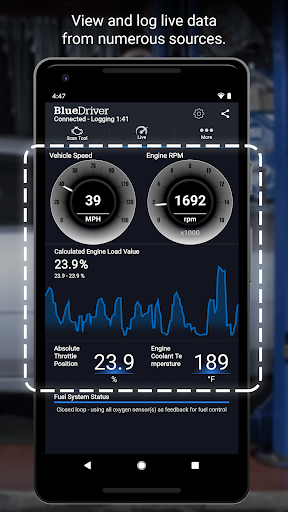
- Supports real-time monitoring of data, allowing you to see various parameters of the engine and immediately discover problems when they go wrong. The response is really fast.
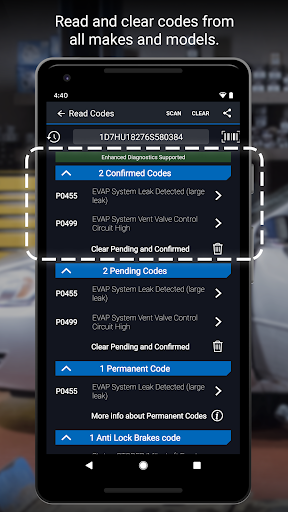
- It can also help you fully scan the OBD2 interface. No matter what brand of car it is, it can read and clear fault codes. It is quite powerful.
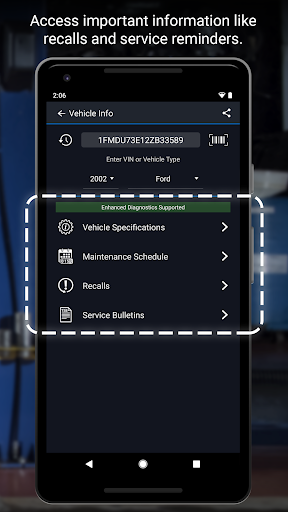
- Automatic recognition of the vehicle identification number (VIN) makes it easy to connect devices without cumbersome operations, saving a lot of time.
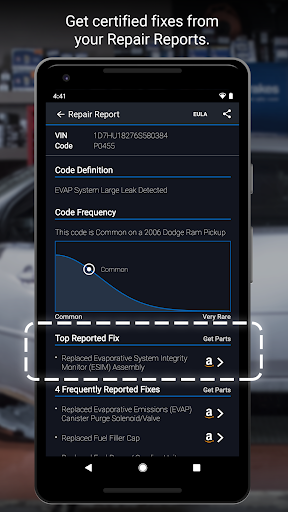
- Detailed reports and troubleshooting suggestions will also be generated to help you understand the root cause of the problem and be more confident of repairing it yourself.
- Considering that sometimes it can be used without the Internet, offline mode is provided so you don't have to worry about it in the wild or remote areas.
- It is very compatible with Android devices and runs smoothly. Whether it is a mobile phone or a tablet, it can be easily handled.
Who is suitable for?
This app is especially useful for car fans, do-it-yourself repair buddies, and professional repair technicians who want to keep track of their car's condition anytime, anywhere.
It is also especially suitable for users who want to monitor vehicle health, rapid detection or in-depth diagnosis with mobile phones, which is convenient, fast and practical.
Why choose this?
The reason why this Android app stands out is that it is comprehensive, simple to operate, and reliable experience. Many people trust it and provide very accurate real-time vehicle data.
It is designed for the common troubleshooting needs of automobiles, helping you save time and money, and giving clear diagnostic suggestions. It is regarded as the leader in autonomous vehicles and vehicle applications and is worth recommending!
Top Recommended Alternative

Pros & Cons
Pros
-
Comprehensive vehicle diagnosis, clear the problem without ambiguity
-
The interface is simple and easy to get started
-
Wireless connection, available anytime, anywhere
-
Automatically identifies the code to save manual checking
-
Customize reminders for more sensory maintenance
Cons
-
Insufficient support for old cars, a little limited
-
Bluetooth has poor stability and will drop
-
Different mobile phones may have different functions
-
Limited features for free
-
Occasionally, data updates will be slow
Advertisement
Download BlueDriver OBD2 Scan Tool
FAQ
Is the BlueDriver OBD2 scanning tool suitable for all models? +
This BlueDriver OBD2 scanner was originally said to be able to handle most cars that support the OBD2 standard after 1996, but it has to be said, don't be too superstitious. Some old or special models may not be very good.
It is a very reliable APP-based car diagnostic tool, and the Android version of the application is quite smooth to use. Remember to make sure your car is compatible, otherwise you may almost not get the ideal experience later.
How can I install and set up the BlueDriver mobile APP? +
It's actually quite simple to install the BlueDriver APP on your mobile phone. The main application markets can be found at a glance, whether it's Android or iOS. After downloading, following those boot operations, you basically don't have to worry about not being able to connect to the OBD2 scanner.
This APP interface is quite intuitive. Whether you are a novice or an old driver, it is very easy to use and can quickly figure out the condition of your car. It is a very reliable diagnostic tool that makes it much easier to use vehicle condition monitoring on your mobile phone.
Will there be security issues when using the BlueDriver APP? Will my vehicle data be leaked? +
Don't worry, this BlueDriver APP cares about privacy. It connects to your car's OBD2 port and uses security measures to not easily transmit your data unless you authorize it yourself.
As an experienced APP-based solution, it strictly adheres to industry safety standards, allowing you to test vehicles without worrying about privacy issues. Its credibility is quite high and it is relatively safe to use.
Can I use BlueDriver without using the Internet? +
That's right, as long as you install the APP and connect it to the OBD2 scanner, most functions can be used offline. This is quite convenient, especially when detecting vehicle status on the road or where there is no Internet.
However, things like software updates still have to be connected to the Internet, and some functions in the cloud also require network support. But overall, it is an all-round tool that can diagnose online and offline, and it is quite practical.
What are the main functions of BlueDriver? +
This APP can detect vehicles in real time, read and clear fault codes, and provide detailed maintenance reports to help you see the health status of the car. The data is intuitive and easy to understand.
It also supports real-time reading of still frame data and sensors, making car owners and technicians less troublesome and easier maintenance. The user experience is also good and the operation is quite easy.
Is BlueDriver suitable for professional technicians and do-it-yourself car fans? +
Of course, it is often used by professional repairmen and car fans who love to build their own cars. It has reliable functions and detailed reports. The accuracy and depth of the data are acceptable, suitable for people with different skill levels.
Its overall performance and compatibility are also very good, and it can be used as both a diagnostic tool and a good helper for driving assistance. Use it with confidence and help you make informed repair decisions.
How often is BlueDriver updated? +
This APP is frequently updated by push, constantly improving performance, adding new features, and expanding the range of supported models. Staying up to date ensures that it does not fall behind in terms of diagnosis.
You can update in the app market, and updates will also improve the overall experience so that you can always use it smoothly. The latest and most secure tools are here.
Does BlueDriver support multiple vehicle profiles? +
Yes, you can save the configuration data of multiple vehicles, which is very convenient to switch diagnosis. Especially if you have more than one car, or worry about the maintenance of a bunch of cars, you can manage them in an orderly manner.
The functional design of this APP supports multi-vehicle management, helping you efficiently process data from different vehicles, making it easy to use, saving time and worry.
Customer Reviews
Users generally praise the BlueDriver OBD2 Scan Tool for its user-friendly interface, informative diagnostics, and excellent value, often calling it a reliable tool for quick scans and professional-grade results. However, feedback reveals critical issues in several key areas. Regarding connection stability, many users report that the app works flawlessly initially but after updates becomes unreliable—failing to connect, crashing, or unable to scan. Some users find it highly dependable across multiple vehicles, while others experience persistent connection failures even after troubleshooting. On functionality, the app's ability to access all modules and live data is a major concern: positive users highlight thorough diagnostics, but negative reviewers note limited module access, high latency, and incorrect vehicle identification (e.g., misidentifying a 6.6L Duramax as a 2.2L 4-cylinder). The latest update removed the feature to read codes from non-engine modules, frustrating many. Language support is another pain point—excellent English-only performance is praised, but Spanish speakers urgently request a Latin American option. Finally, the mandatory account creation after an update is seen as unnecessary data harvesting, reducing trust. In summary, BlueDriver offers solid diagnostic basics when it works, but recent updates have introduced instability and feature regressions that undermine its reputation.
Write a Review
Share your experience with BlueDriver OBD2 Scan Tool. Submissions are reviewed before publishing.
You Might Also Like
More apps you may want to try next.