Blood Donor
Advertisement
Screenshots
Advertisement
About Blood Donor
Overview
core functions
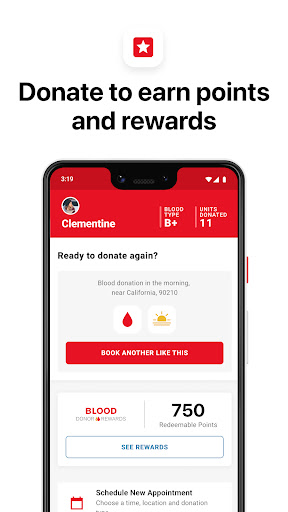
- This app has a very simple blood donor registration system, which is super convenient to register and can also help you find blood donors quickly. It is really worry-saving and practical.
- Blood inventory is updated in real time to ensure that hospitals and users can keep up to date with the latest blood type information and quantity, so that they don't have to worry about ischemia.
- The built-in notification system will remind blood donors of upcoming blood donation activities and some important health information. It is quite considerate.
- Support secure data encryption to ensure user privacy, users can use it more at ease and are more willing to trust this platform.
- Combined with the geolocation function, it helps you easily find the nearest blood donation point without wasting time running around.
- The experience is quite friendly, the navigation is smooth, and first-time users can get started quickly without worrying about not understanding it.
- There is also an offline mode, which allows you to find some important information even if you don't have the Internet. It's a very thoughtful design.
- This Android app provides a complete platform that combines various functions and greatly simplifies the blood donation process.
applicable population
This software is especially suitable for professionals who care about health, like volunteering, or are in the medical industry who want to save lives by donating blood. The users targeted are starting at least 18 years old, and there are many people who want to find a reliable App to donate and track blood donations.
Whether it's organizing a blood donation campaign or simply trying to find a nearby blood station, many of the troubles have become much easier after using this app. Especially for those who seek convenience and want to join a trusted blood donation community, it is a boon.
Why choose this app
This app is quite famous among Android software in the medical category. It has comprehensive functions and can help you efficiently manage blood donation. It pays special attention to security and real-time updates, and is deeply trusted by users and feels quite reliable.
Through a user-friendly operating interface and powerful solutions, it solves common problems such as finding blood donors and managing blood inventories, and it is not unusual for it to become the platform of choice for many health organizations and individual blood donors.
Top Recommended Alternative

Pros & Cons
Pros
- The user interface is very friendly
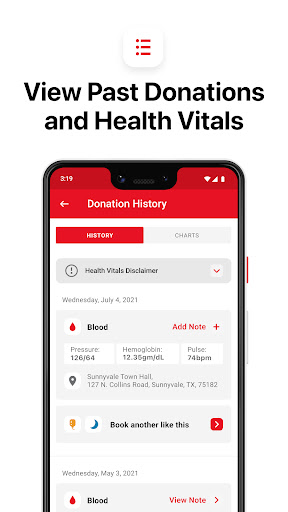
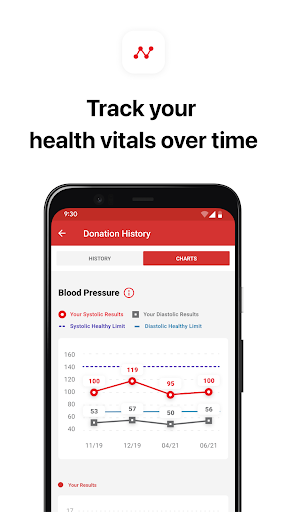
- All aspects of donation records
- Push reminder function
- Locating blood banks is easy to find
- rich educational resources
Cons
- Fewer language choices
- Offline functions are not rich enough
- Occasionally disconnected and crashed on old equipment
- Limited customization settings
- Data security measures need to be strengthened
Advertisement
Download Blood Donor


FAQ
Is the Blood Donor app safe to use?+
Yes, the blood donor app pays attention to user safety and privacy. Industry standards are also followed when developing to ensure that you can log in safely and your personal information is protected.
Rememberto download it from official channels such as Google Play or Apple's App Store, and don't create an unreliable version to avoid security issues. Keep the safety settings of your device turned on for more peace of mind.
How do I create an account on the Blood Donor app?+
Getting started with the Blood Donor App. After installing the Android or iOS version, fill in some information according to the registration guidelines and you will be able to complete your personal data. Its registration and data management are quite convenient and very user-friendly.
Can I use the Blood Donor app on my tablet or only on smartphones?+
This app can be used on both mobile phones and tablets, and there is no problem. Whether it's Android tablets or Apple's, it runs smoothly. Different screen sizes can be adapted well and are easy to use.
What are the main features of the Blood Donor app?+
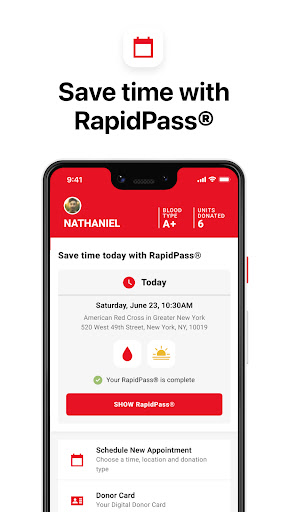
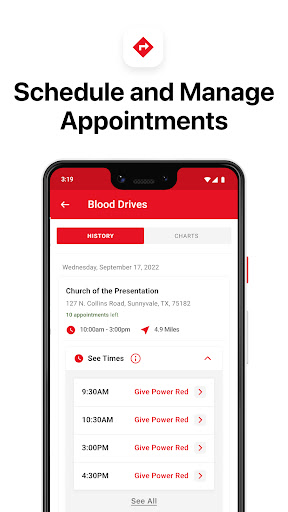
Its main features include real-time push notification of donation opportunities, convenient appointment of blood donation, and full location inquiry. Overall, the design is quite comprehensive, and there are many convenient tools for people who want to help donate blood.
Thesefeatures make it easier to donate blood and encourage people to stick to donating blood, which is good.
Is the Blood Donor app available in multiple languages?+
It is still mainly English now, but there may be some regional versions that will be available in other languages. You can check on your mobile phone to see if there is a language choice in the settings for easy use.
Multi-lingualsupport allows blood donors from different backgrounds to use it more smoothly and makes it easier for everyone to participate.
How often is the app updated?+
This blood donor app is very diligent. It often pushes updates, fixes bugs, improves functions, and makes security higher. Keep the latest version and you can enjoy a smoother and safer experience.
Themain update channels are Google Play and Apple Store, which reflects their intention to maintain the platform and also gives users more peace of mind.
Does the app work offline or require an internet connection?+
Basically, you need to be connected to the Internet to work well, especially the push notification and appointment functions. However, some information, such as the location of the blood station, can also be viewed offline after initial loading, which is quite convenient.
Itis designed this way so that you can find important information anytime and anywhere, making the experience smoother.
What should I do if I forget my login details?+
If you can't remember your login information, you can use the "Forget Password" function, which is very convenient whether in the app or on the login page. Usually an email will be sent telling you how to reset your password.
Thisprocess is safe and reliable, helping you easily retrieve your account without worrying about being stolen by others.
You Might Also Like
More apps you may want to try next.