
Advertisement
Screenshots
Advertisement
About Blink Charging Mobile App
The Blink Charging Mobile App is actually a very intuitive mobile app that helps electric vehicle owners easily find charging piles. It supports Android and iOS, and the operation is quite smooth. It can provide real-time information about the charging station, payment methods, and account management at any time, making charging more convenient and easier to handle. It is a very considerate gadget.
Overview
core features
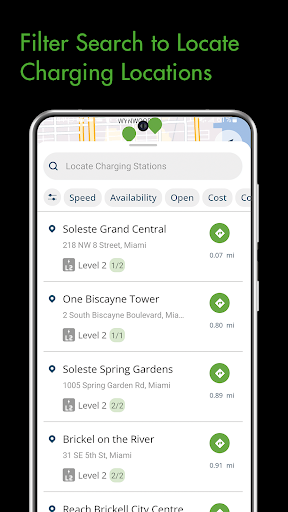
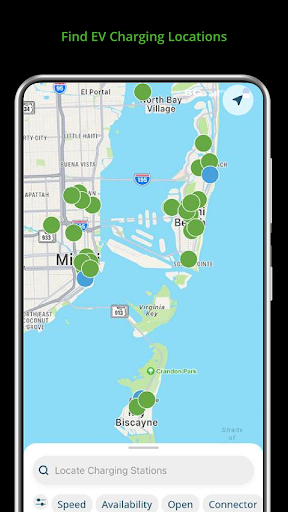
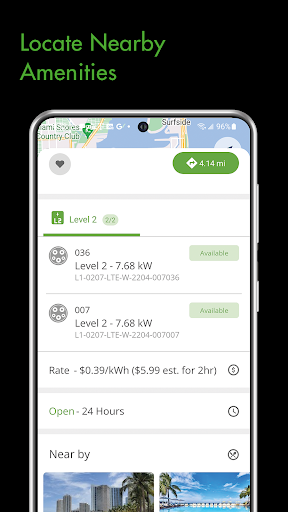
- It allows users to easily find and book charging stations and update their idle status in real time, making it convenient and worry-free.
- Account management is super smooth, you can view charging records and payment history inside, making it very convenient to operate.
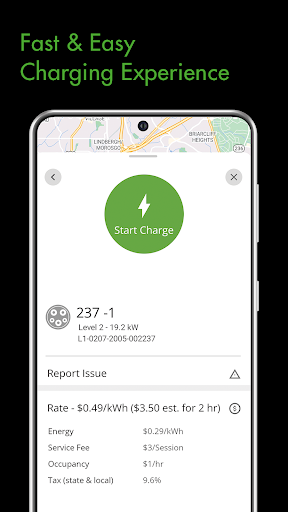
- There are many payment methods, from credit cards to electronic wallets, so transactions don't have to worry about getting stuck.
- Push charging status and site idle reminders in real time without missing any important information.
- Detailed site maps and navigation functions help you easily find the charging location without any effort.
- Remotely starting and stopping charging makes the control more flexible and upgrades the user experience a lot.
- The interface is intuitive and the operation is simple and smooth. Whether it is Android or other devices, you can quickly get started.
- Provides charging history and usage analysis to help you better manage the charging needs of electric vehicles.
Who is this app suitable for?
This mobile phone software is mainly prepared for electric car owners and drivers, and they are interested in a reliable charging management application. Whether you are young people who are technical nerds or old drivers who need efficient stations, you can find use.
Whether you are commuting every day or traveling long distances occasionally, this app will help you find charging stations, manage the charging process, and ensure that your car is fully charged at all times. For people who rely on electric mobility, this is simply an artifact!
Why choose this app
This software can be regarded as a one-stop solution, rich in features, and can make charging your electric vehicle easier-with real-time information, remote control and so on. With friendly interface and detailed site data, it is a favorite choice for many electric car owners.
It specifically solves charging problems and provides reliable and easy-to-use functions that make users feel worry-free and time-saving, becoming a smarter and more convenient electric vehicle charging housekeeper!
Pros & Cons
Pros
- Super user friendly interface
- Display charging station status in real time
- Too many payment methods
- Remotely manage charging
- Full support functions
Cons
- Charging station coverage is not wide enough
- Occasionally I get stuck and collapse
- It consumes a lot of electricity
- Not much language support
- Push notifications too frequently
Advertisement
Download Blink Charging Mobile App


FAQ
Is the Blink Charging Mobile App easy to set up and use?+
Well, Blink Charging's mobile app is actually quite easy to use. It's quite simple to make settings and something that can be easily done by even a novice. The interface is quite intuitive, as if it will lead you every step, which is quite considerate.
Afteryou install it on your Android phone, the whole experience will be quite smooth and user-oriented. Whether or not you are using the charging App for the first time, you can always find a comfortable feeling, which allows you to manage charging devices without worry and effort.
Does the Blink Charging Mobile App provide real-time monitoring?+
Of course! One of the biggest features of this app is that it can track charging status in real time, so you can keep track of charging progress anywhere you are. There is no need to go to the scene for remote monitoring. It will be clear at a glance on the mobile phone.
Moreover, the design is very thoughtful. You can check the current charging session at any time, understand the idle status of the charging pile, and receive notification of the charging status. The whole experience is convenient and efficient.
Is the Blink Charging Mobile App safe and secure to use?+
Don't worry! Security and privacy protection have always been the focus of the Blink Charging mobile app. The encryption technology it uses is very powerful and the login process is very strict, which can ensure the security of your personal information and payment data.
Youcan trust that this app will keep your information confidential and can be used with peace of mind, whether on Android devices or other compatible platforms, without worrying about information being leaked.
Can I customize settings and notifications in the Blink Charging Mobile App?+
Of course! The notification settings of this app are particularly flexible, and you can define when to remind you, such as when you are fully charged or when there is a fault. This way, you can easily grasp the real-time status of the charging station and be carefree.
Thesepersonalized settings make it easier for you to use, and can also be adjusted according to your habits to meet your needs to the greatest extent possible, making charging management more considerate.
Is the Blink Charging app compatible with all smartphones?+
This app is quite versatile, and basically most Android phones can be used smoothly. For Apple users, it can also be found in the App Store, and the experience is quite consistent.
Whetheryou use Android or iPhone, as long as you need to manage a charging station, Blink Charging Mobile App is competent, reliable, and has a non-critical experience.
Customer Reviews
Users appreciate the fast charging speed in some locations (e.g., reaching 100% in 1 min 25 sec, excellent 5.7kW load) and smooth operation when it works. However, the app is widely criticized for instability: frequent crashes, failed installations, login issues, and unresponsive support. Pricing is a major pain point—many report hidden fees ($10 for $0.80 charge, $1,040 for one hour) and higher rates than competitors. The interface is slow, logs users out frequently, and lacks essential features like charge completion notifications. While some find the app functional, others deem it nearly unusable due to persistent bugs, poor navigation, and inaccurate maps. The overall experience is frustrating, with many users recommending alternatives.
Write a Review
Share your experience with Blink Charging Mobile App. Submissions are reviewed before publishing.
You Might Also Like
More apps you may want to try next.